Get Commercial Invoice Template Form
How it works
-

Open form follow the instructions
-

Easily sign the form with your finger
-

Send filled & signed form or save
How to fill out the Commercial Invoice Template Form online
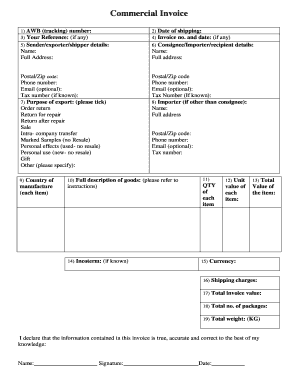
This guide provides a comprehensive walkthrough for completing the Commercial Invoice Template Form online. By following this step-by-step guide, users will be equipped to accurately fill out the form for shipping purposes.
Follow the steps to successfully complete the Commercial Invoice Template Form.
- Click 'Get Form' button to obtain the form and open it in the editor.
- Enter the AWB (tracking) number, which is typically provided when booking your shipment.
- Specify the date of shipping to indicate when the goods are dispatched.
- If applicable, provide an invoice number and date for reference.
- Fill in the sender/exporter/shipper details, including name, full address, postal/zip code, phone number, email (optional), and tax number (if known).
- Complete the consignee/importer/recipient details with their name, full address, postal/zip code, phone number, email (optional), and tax number (if known).
- Select the purpose of export by ticking the appropriate box, such as 'Order return,' 'Personal use,' or 'Sale.'
- If the importer is different from the consignee, provide their name and full address along with postal/zip code, phone number, email (optional), and tax number.
- Specify the country of manufacture, ensuring it is country-specific.
- Provide a full description of the goods, including what they are and their use. Include tariff codes if possible.
- Indicate the quantity of each item you are shipping.
- Specify the value of each item individually.
- Calculate and provide the total value of the items being shipped.
- If known, specify the Incoterm that applies to the shipment.
- Indicate the currency in which the values have been recorded.
- Detail the shipping charges, including transportation and insurance costs.
- Provide the total invoice value, which includes merchandise, shipping, and insurance.
- State the total number of packages being shipped.
- Indicate the total weight of the shipment in kilograms (KG).
- Sign and date the declaration confirming the accuracy of the information provided.
- Once completed, save changes, download, print, or share the form as required.
Complete your commercial invoices online today for a smoother shipping experience.
To fill out a commercial invoice, begin by providing your business details and your client's contact information, followed by a detailed list of products or services provided. Ensure to include terms of payment, shipment details, and any other relevant information. A Commercial Invoice Template Form can assist you by providing a clear and efficient structure, making the process straightforward and helping you avoid missing any important details.