Loading
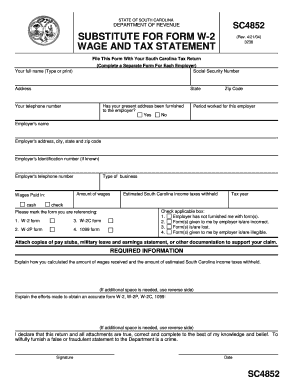
Get Substitute For Form W 2
How it works
-

Open form follow the instructions
-

Easily sign the form with your finger
-

Send filled & signed form or save
How to fill out the Substitute For Form W-2 online
Filling out the Substitute For Form W-2 online is essential for reporting your wages and taxes when your employer has not provided you with an official W-2 form. This guide provides you with comprehensive, step-by-step instructions to help you complete this form accurately and effectively.
Follow the steps to complete your Substitute For Form W-2 online
- Click ‘Get Form’ button to obtain the form and open it in the editor.
- Begin by entering your full name at the top of the form. Ensure that you type or print clearly to avoid any processing issues.
- Provide your Social Security number. This is mandatory for identification purposes.
- Fill in your address, including the city, state, and zip code.
- Indicate whether you have furnished your present address to your employer by selecting ‘Yes’ or ‘No’.
- Enter your telephone number for contact purposes.
- Specify the period you worked for the employer in the space provided.
- Next, enter the employer's name and their address, including city, state, and zip code.
- If known, input the employer's identification number.
- Fill in the employer’s telephone number.
- State the amount of wages you received. In the corresponding section, indicate whether these wages were paid in cash or another form.
- Identify the type of business of your employer.
- Enter the estimated South Carolina income taxes that were withheld from your wages.
- Specify the tax year for which you are completing this form.
- Mark the relevant box indicating the type of form you are referencing, such as W-2 form, W-2C form, W-2P form, or 1099 form.
- Check the applicable box that describes your situation regarding the employer not furnishing a form, providing incorrect forms, or if you lost or received illegible forms.
- Attach supporting documentation such as pay stubs or other earnings statements to substantiate your claim.
- In the required information section, explain how you calculated your total wages and the estimated South Carolina income taxes withheld.
- Detail the efforts you made to obtain an accurate form from your employer.
- Finally, review the entire form for accuracy, then sign and date it to declare that the information provided is true and complete before submitting it with your South Carolina tax return.
Complete your documents online to ensure swift processing.
Related links form
Yes, you can e-file your tax return using a substitute for Form W-2. It is important to ensure that all information is accurately reported when using this substitute. This method can streamline your filing process and can be facilitated through reputable platforms like US Legal Forms, easing your tax preparation journey.