Loading
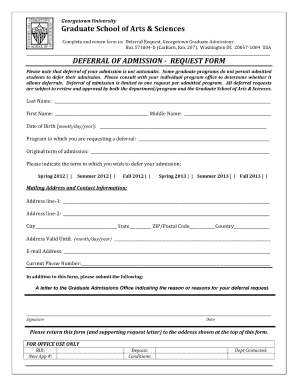
Get Georgetown Deferral Request Form
How it works
-

Open form follow the instructions
-

Easily sign the form with your finger
-

Send filled & signed form or save
How to fill out the Georgetown Deferral Request Form online
Filling out the Georgetown Deferral Request Form online can seem challenging, but with clear guidance, you can navigate it easily. This guide is designed to help users of all backgrounds complete the form accurately and efficiently.
Follow the steps to complete the Georgetown Deferral Request Form online.
- Press the ‘Get Form’ button to access the Georgetown Deferral Request Form and open it in your preferred editing tool.
- Read through the introduction section carefully, as it provides important context and instructions regarding the deferral request process.
- In the first section, enter your personal information, including your name, contact details, and any identification numbers as required.
- Address the reason for your deferral request in the designated section. Be clear and specific about the circumstances leading to your request.
- Provide any supporting documentation in the specified field, if applicable, to substantiate your request.
- Review all the information you have entered to ensure it is accurate and complete before proceeding.
- Once you have filled out all required fields, you will have the option to save your changes, download a copy of the form, print it, or share it as needed.
Take the first step in managing your deferral request by completing the Georgetown Deferral Request Form online today.
Related links form
Bankruptcy Forms. El Cotija Mexican Restaurant, Inc. - Wesley J. Boyer 073126
Federal Grant Applications - Office Of Planning And Research - State Of ...
SPAIN - UMD Alumni Association - Welcome - University Of Maryland - Umaa Umd
And Save $500 Per Couple! - Alumni - Cornell University - Alumni Cornell
Filling out a deferral form involves providing personal information, academic details, and your reasons for deferral. Be concise yet detailed in your explanations to make a compelling case. For guidance, the Georgetown Deferral Request Form offers sections that prompt you to include the necessary information, ensuring you do not miss critical points.