Loading
Get Edrs Washington
How it works
-

Open form follow the instructions
-

Easily sign the form with your finger
-

Send filled & signed form or save
How to fill out the Edrs Washington online
This guide provides a comprehensive and user-friendly approach to completing the Edrs Washington enrollment form online. Whether you have prior experience or are new to the process, you'll find clear instructions to navigate each section with ease.
Follow the steps to accurately complete the Edrs Washington form.
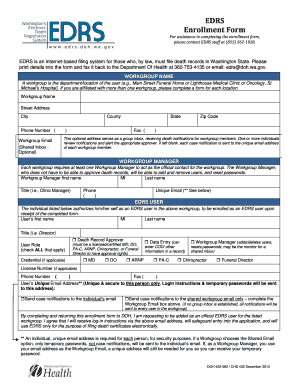
- Click ‘Get Form’ button to obtain the enrollment form and open it in your preferred document editor.
- Enter your workgroup name in the designated field. This should reflect the department or location you are associated with, such as 'Main Street Funeral Home' or 'Oncology, St. Michael’s Hospital'.
- Fill in the workgroup's street address, city, county, state, and zip code to provide a complete mailing address.
- Provide the phone number and optional fax number for the workgroup, ensuring you include the correct area code.
- If applicable, enter a workgroup email address. This serves as a shared inbox for receiving death notifications if desired.
- Designate a workgroup manager by entering their first name, middle initial, last name, title, phone number, and unique email address.
- List the user’s first name, middle initial, last name, title, and select the appropriate user role(s) from the options provided, making sure to check all that apply.
- If relevant, provide the license number for the user along with their phone number and fax number.
- Specify the user’s unique email address, ensuring it is secure and unique to that individual. Confirm notification preferences for case notifications.
- After confirming that all fields are correctly filled out, review the document. Save your changes, and you may choose to download, print, or share the completed form as needed.
Complete your Edrs Washington enrollment form online today for efficient digital document management.
When filling out a death certificate, avoid including personal opinions or ambiguous terms that do not clearly define the cause of death. Also, refrain from adding unnecessary information that could complicate the understanding of the document. Edrs Washington guides users by clarifying what is essential, ensuring that you complete the certificate accurately without including extraneous details.
Industry-leading security and compliance
US Legal Forms protects your data by complying with industry-specific security standards.
-
In businnes since 199725+ years providing professional legal documents.
-
Accredited businessGuarantees that a business meets BBB accreditation standards in the US and Canada.
-
Secured by BraintreeValidated Level 1 PCI DSS compliant payment gateway that accepts most major credit and debit card brands from across the globe.