Loading
Form preview
  • US Legal Forms
  • Other Templates
  • More Forms
  • More Uncategorized Forms
  • Umuc Supplemental Form

Get Umuc Supplemental Form

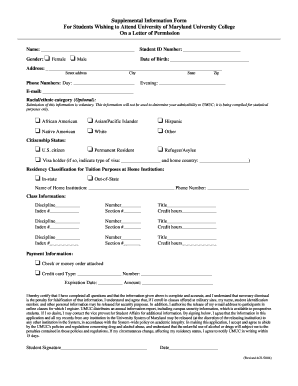
Ne Numbers: Day: State Zip Evening: E-mail: Racial/ethnic category (Optional): Submission of this information is voluntary. This information will not be used to determine your admissibility to UMUC; it is being compiled for statistical purposes only. o African American o Native American o Asian/Pacific Islander o White o Hispanic o Other Citizenship Status: o U.S. citizen o Permanent Resident o R.

How it works

  1. Open form

    Open form follow the instructions

  2. Easily sign form

    Easily sign the form with your finger

  3. Share form

    Send filled & signed form or save

How to fill out the Umuc Supplemental Form online

The Umuc Supplemental Form is essential for students wishing to enroll at the University of Maryland University College on a letter of permission. This guide provides clear instructions to help you complete the form accurately and efficiently online.

Follow the steps to complete the Umuc Supplemental Form online.

  1. Click ‘Get Form’ button to obtain the form and open it in the editor.
  2. Fill in your name in the designated field at the top of the form.
  3. Enter your student ID number accurately to ensure proper identification.
  4. Indicate your gender by selecting the appropriate option.
  5. Provide your date of birth in the specified format.
  6. Complete your address by filling in your street address, city, state, and zip code.
  7. List your phone numbers for daytime and evening contact.
  8. Input your email address in the provided field.
  9. Optionally, select your racial/ethnic category as prompted.
  10. Indicate your citizenship status by selecting the appropriate category.
  11. Specify your residency classification for tuition purposes.
  12. Fill in the name and phone number of your home institution.
  13. Provide class information by entering the discipline, index number, class number, section number, title, and credit hours for each course you wish to take.
  14. Select your payment information method and provide the necessary details.
  15. Read the certification statement, and if you agree, sign and date the form.
  16. Once you have completed all fields, save your changes, then download, print, or share the form as needed.

Completing your documents online is efficient and straightforward. Begin the process today!

Get form

Experience a faster way to fill out and sign forms on the web. Access the most extensive library of templates available.
Get form

Related content

Supplemental Information Form For Students...
If I so desire, I may contact the Vice Provost for Student Affairs for additional...
Learn more
Contract Modification Authority Decision Help...
lateral,” or “supplemental agreement” modifications and require both the...
Learn more

Related links form

2004IT47NEW Microsoft Word - TC 96-182.docx Whitmer Signs Repeal Of Nation's Only Immunity Law That ... New Mexico Announces 2024 Tax Filing Season Begins ...

Questions & Answers

Get answers to your most pressing questions about US Legal Forms API.

Contact support

Applying to the University of Maryland Global Campus involves several straightforward steps to ensure you are ready for your educational journey. First, you need to complete the online application form, and during this process, you may encounter the UMUC Supplemental Form, which helps collect essential information. After submitting your application, you should prepare your transcripts and other required documents. Finally, once your application is complete, you can look forward to receiving a decision and the next steps toward enrollment.

The permission to enroll form at the University of Maryland Global Campus (UMGC) is a critical document that students must submit to register for courses. This form ensures that students meet specific prerequisites and receive approval from their academic advisors. Completing the UMUC Supplemental Form allows you to clarify your academic standing and make the enrollment process smoother. It is essential for a successful transition into your desired courses at UMGC.

Full-time enrollment at UMGC is defined as taking at least 12 credits per semester. This status can impact financial aid eligibility and access to various university services. If you're considering changing your enrollment status, remember to submit the Umuc Supplemental Form if required to ensure a seamless transition.

At UMGC, students can typically take up to 18 credits per semester. This limit provides flexibility for students balancing full-time study with other commitments. If you plan to exceed this limit, you will need to fill out the Umuc Supplemental Form to request permission to enroll in more courses.

The timeframe for receiving your refund from UMGC generally takes about four to six weeks after the start of classes. It depends on various factors, including method of disbursement. To ensure your financial matters are in order, make sure all necessary forms, including the Umuc Supplemental Form if applicable, are submitted on time.

Half-time enrollment at UMGC typically consists of taking a minimum of six credits per semester. This status allows students to maintain eligibility for financial aid while engaging in a manageable course load. Remember, if you need to adjust your enrollment, you may need to submit the Umuc Supplemental Form to update your records.

Registering for UMGC is a straightforward process. Begin by visiting the UMGC website, where you can create an account and complete the online application. After submitting your application, you can monitor your status through your student portal, ensuring you don't miss any necessary documents like the Umuc Supplemental Form.

The acceptance rate for UMGC is relatively high, reflecting its commitment to providing educational opportunities for a diverse student population. This accessibility helps many individuals pursue their educational dreams. Understanding the acceptance rate can help you gauge your chances of admission. For more insights into your application process, check out the resources provided through the Umuc Supplemental Form.

At UMGC, the passing grade is typically a grade of 'C' or higher, which equates to a 2.0 on a 4.0 scale. Achieving this grade is crucial for maintaining good academic standing and progressing in your studies. By understanding the grading system, you can set realistic academic goals. For any academic support you need, consider using the Umuc Supplemental Form to access resources.

To get into UMGC, you typically need a minimum GPA of 2.0. However, higher GPAs can increase your chances of admission and eligibility for certain programs. It is essential to review the specific requirements for your desired major. If you need assistance with your application, the Umuc Supplemental Form can provide vital information to help you succeed.

Get This Form Now!

Use professional pre-built templates to fill in and sign documents online faster. Get access to thousands of forms.
Get form
If you believe that this page should be taken down, please follow our DMCA take down processhere.
Get Umuc Supplemental Form
Get form
  • Adoption
  • Bankruptcy
  • Contractors
  • Divorce
  • Home Sales
  • Employment
  • Identity Theft
  • Incorporation
  • Landlord Tenant
  • Living Trust
  • Name Change
  • Personal Planning
  • Small Business
  • Wills & Estates
  • Packages A-Z
  • Affidavits
  • Bankruptcy
  • Bill of Sale
  • Corporate - LLC
  • Divorce
  • Employment
  • Identity Theft
  • Internet Technology
  • Landlord Tenant
  • Living Wills
  • Name Change
  • Power of Attorney
  • Real Estate
  • Small Estates
  • Wills
  • All Forms
  • Forms A-Z
  • Other Templates
  • Legal Hub
  • About Us
  • Help Portal
  • Legal Resources
  • Blog
  • Affiliates
  • Contact Us
  • Delete My Account
  • Site Map
  • Industries
  • Forms in Spanish
  • Localized Forms
  • State-specific Forms
  • Forms Kit
  • Real Estate Handbook
  • All Guides
  • Notarize
  • Incorporation services
  • For Consumers
  • For Small Business
  • For Attorneys
  • USLegal
  • FormsPass
  • pdfFiller
  • signNow
  • altaFlow
  • DocHub
  • Instapage
Form Packages
  • Adoption
  • Bankruptcy
  • Contractors
  • Divorce
  • Home Sales
  • Employment
  • Identity Theft
  • Incorporation
  • Landlord Tenant
  • Living Trust
  • Name Change
  • Personal Planning
  • Small Business
  • Wills & Estates
  • Packages A-Z
Form Categories
  • Affidavits
  • Bankruptcy
  • Bill of Sale
  • Corporate - LLC
  • Divorce
  • Employment
  • Identity Theft
  • Internet Technology
  • Landlord Tenant
  • Living Wills
  • Name Change
  • Power of Attorney
  • Real Estate
  • Small Estates
  • Wills
  • All Forms
  • Forms A-Z
  • Other Templates
Customer Service
  • Legal Hub
  • About Us
  • Help Portal
  • Legal Resources
  • Blog
  • Affiliates
  • Contact Us
  • Delete My Account
  • Site Map
  • Industries
  • Forms in Spanish
  • Localized Forms
  • State-specific Forms
  • Forms Kit
Legal Guides
  • Real Estate Handbook
  • All Guides
Prepared for you
  • Notarize
  • Incorporation services
Our Customers
  • For Consumers
  • For Small Business
  • For Attorneys
Our Sites
  • USLegal
  • FormsPass
  • pdfFiller
  • signNow
  • altaFlow
  • DocHub
  • Instapage
Social Media
Call us now toll free:
+1 833 426 79 33
As seen in:
© Copyright 1999-2026 airSlate Legal Forms, Inc. 17 Station Street, Ste. 203, Brookline, MA 02445
  • Your Privacy Choices
  • Terms of Service
  • Privacy Notice
  • Content Takedown Policy
  • Bug Bounty Program