Loading
Get Nih Form 1861
How it works
-

Open form follow the instructions
-

Easily sign the form with your finger
-

Send filled & signed form or save
How to fill out the Nih Form 1861 online
Navigating the Nih Form 1861 can seem challenging, but this guide will simplify the process for you. By following these steps, you can effectively complete the form online, ensuring all necessary information is accurately provided.
Follow the steps to successfully complete the Nih Form 1861.
- Click 'Get Form' button to access and open the Nih Form 1861 in your chosen online platform.
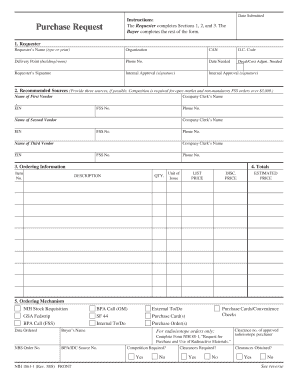
- In Section 1, fill in the requester's details. Enter your name, organization, delivery point, and phone number. Specify the date you need the order and indicate if decal or cost adjustment is required. Provide your signature and include signatures for internal approval.
- In Section 2, list three recommended sources. For each vendor, provide their name, company clerk's name, employer identification number (EIN), Federal Supply Schedule (FSS) number, and contact phone number.
- In Section 3, enter the order information, including item number and detailed description of each item along with quantities and prices. Include the unit price, discount price, and estimated total price for each item.
- In Section 4, select the ordering mechanism by checking the appropriate option. Indicate the date ordered and provide any notes for internal or external tasks related to the purchase.
- Complete Section 5 regarding mandatory source availability. Indicate if any items are available from mandatory sources and provide necessary explanations if none are selected.
- In Section 6, provide justifications for not selecting mandatory sources if applicable. Explain reasons such as compatibility or stock availability.
- Provide justification for sole-source procurement in Section 7 if relevant. Check all applicable options and provide explanations for each.
- In Section 8, detail competition among vendors for orders over $3,000. List the vendors, their prices, and provide comments on your interactions.
- Finally, in Section 9, check the price reasonableness criteria. Indicate the lowest price quoted and any previous order comparisons to support your selection.
- Once all sections are filled out, review the form for accuracy, save your changes, and decide if you want to download, print, or share the completed form.
Encourage others to complete their documents online for efficiency and convenience.