Loading
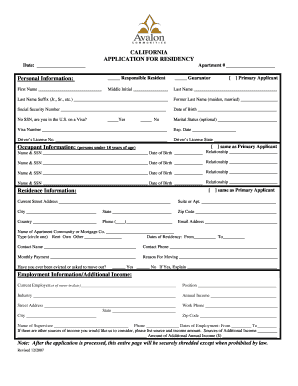
Get Residency Verification Form
How it works
-

Open form follow the instructions
-

Easily sign the form with your finger
-

Send filled & signed form or save
How to fill out the Residency Verification Form online
Completing the Residency Verification Form online can streamline the application process for securing your residence. This guide will provide you with detailed, step-by-step instructions to ensure that you fill out the form accurately and effectively.
Follow the steps to successfully complete your residency verification form.
- Press the ‘Get Form’ button to access the Residency Verification Form and open it in your online editor.
- Begin by entering the date and apartment number at the top of the form to identify your application correctly.
- In the personal information section, indicate whether you are the responsible resident or a guarantor by checking the appropriate box. Then, fill in your first name, middle initial, last name, and any suffix if applicable.
- Provide any former last names you might have, along with your social security number or indicate if you do not have one and are in the U.S. on a visa. If applicable, note your visa number and expiration date.
- Complete the marital status question and indicate if you are the primary applicant. If applicable, fill in your driver’s license number and the state of issue.
- Proceed to the occupant information section for all individuals under 18 residing with you, entering their names, social security numbers, dates of birth, and your relationship to each occupant.
- Provide your current street address, including suite or apartment number, city, state, zip code, and country. Don’t forget to include your phone number and email address.
- In the residence information section, indicate whether your address is the same as the primary applicant’s or fill in your current residence details.
- Fill in the contact information for your apartment community or mortgage company, including the type of payment, duration of residency, reason for moving, and whether you have ever been evicted.
- Next, enter your employment information, including current employer, position, annual income, and work address. Don’t forget the supervisor's name and phone number, along with dates of employment.
- If applicable, provide information regarding any additional sources of income.
- Continue to the emergency information section, providing contact details of someone not living in the apartment and their relationship to you.
- If you own any vehicles, fill in the vehicle information, including make, model, year, color, and license plate details. This step also applies if you have pets or service animals, where you’ll provide required details about them.
- Review all the information you have entered for accuracy and completeness.
- Once satisfied with the details, save the changes, download a copy for your records, and proceed to print or share the form as necessary.
Complete your residency verification form online today and ensure a smooth transition to your new home!
To write a letter of residency verification, start with your name, current address, and the date. Clearly state the relationship between you and the verifying party and request their confirmation of your residence. Use a Residency Verification Form to ensure all necessary elements are included, allowing for a professional and complete presentation.