Loading
Get Form 4782 (rev. July 1997 )
How it works
-

Open form follow the instructions
-

Easily sign the form with your finger
-

Send filled & signed form or save
How to fill out the Form 4782 (Rev. July 1997) online
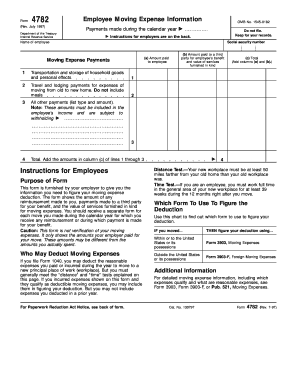
This guide will assist you in completing the Form 4782 (Rev. July 1997) online accurately and efficiently. This form is used to document employee moving expense reimbursements and provides essential information for tax purposes.
Follow the steps to complete the form with ease.
- Click the ‘Get Form’ button to obtain the form and open it in the editor.
- Begin filling out the form by entering the name of the employee in the designated field.
- Input the employee's social security number where indicated.
- For line 1, enter the amount paid to the employee for the transportation and storage of household goods and personal effects.
- For line 2, fill in the travel and lodging payments for the move from the old home to the new home. Remember, do not include meals.
- In line 3(a), provide the total amount paid to a third party for the employee's benefit and the value of services furnished in kind.
- For line 3(b), list all other payments related to moving expenses, indicating the type and amount.
- Calculate the total for line 4 by adding the amounts in column (c) of lines 1 through 3.
- Review the completed form for accuracy and completeness before saving it.
- At the end, save your changes, download, print, or share the form as needed.
Start filling out the Form 4782 (Rev. July 1997) online today for a smooth and organized move.