Loading
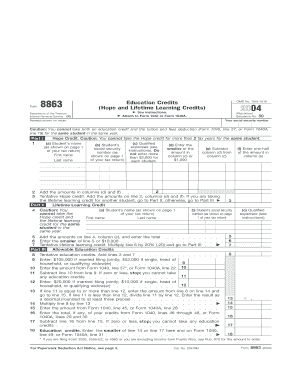
Get Irs Form 8863 2004 Online
How it works
-

Open form follow the instructions
-

Easily sign the form with your finger
-

Send filled & signed form or save
How to fill out the Irs Form 8863 2004 Online online
Filling out the Irs Form 8863 2004 online is essential for claiming education credits that can help reduce your tax liability. This guide provides step-by-step instructions to assist users in accurately completing the form.
Follow the steps to successfully complete the Irs Form 8863 2004 Online.
- Click ‘Get Form’ button to obtain the form and open it in the editor.
- Enter your name and social security number as indicated at the beginning of the form. Ensure the details match those on your tax return.
- In Part I, you will need to provide details for each student qualifying for the Hope credit. Fill in the student's name, social security number, and the qualified expenses paid in 2004.
- Calculate the amount eligible for the Hope credit by entering the smaller of the qualified expenses or $2,000 for each student.
- Add the amounts calculated and proceed to Part II for the Lifetime Learning credit if applicable. Here, enter similar details for students eligible for this credit.
- After completing both parts, total the entries from each section to figure your allowable education credits in Part III.
- Finally, review the entire form for accuracy, save your changes, and choose to download, print, or share your completed Irs Form 8863 2004 online.
Complete your Irs Form 8863 2004 Online today for potential tax savings!
Related links form
Pesticide Application Record Structural Pest Control - Mda State Mn
Suffolk County Executive Steve Bellone Names First Female ...
CA Victor Valley Union High School District Chronic Illness Verification Form (CIVF) Information 2022
Chronic Illness Verification Form - Child Welfare & Attendance (CA Dept Of Education). The
Filing IRS Form 8863 2004 Online can seem complex, but it becomes manageable with the right guidance. The form requires accurate details about your education expenses and the tax credits applicable to you. If you feel uncertain, consider using uslegalforms for step-by-step assistance and helpful resources. This support can simplify the process and boost your confidence in filing.