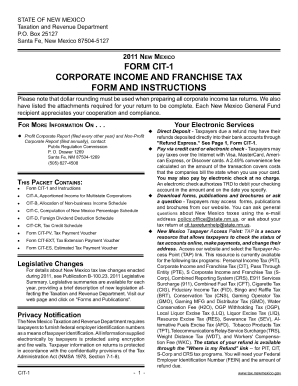
STATE OF NEW MEXICO Taxation and Revenue Department P.O. Box 25127 Santa Fe, New Mexico 87504-5127 FoRM ciT-1 coRPoRATe iNcoMe AND FRANcHiSe TAx FoRM AND iNSTRUcTioNS Please note that dollar rounding.
Open form follow the instructions
Easily sign the form with your finger
Send filled & signed form or save
How to fill out the New Mexico Cit 1 online
The New Mexico Cit 1 form is an essential document for users needing to submit specific information online. This guide will walk you through each section of the form, ensuring you understand how to complete it accurately and efficiently.
Follow the steps to successfully complete the New Mexico Cit 1 online
- Click ‘Get Form’ button to access the form and open it in your preferred editor.
- Review the introduction section of the form. This section may provide useful context about what the form is used for and the information required.
- Locate the personal information section. Fill in all required fields, ensuring to provide accurate details such as your full name, contact information, and any identification numbers as requested.
- Moving on to the specific details section, ensure you read the instructions carefully. Respond to any inquiries thoroughly, as this information is crucial for the processing of your submission.
- Double-check the information you have entered for accuracy and completeness. It’s important that all fields are filled as indicated.
- Once you have completed the form, look for options to save your changes. You may also have the option to download, print, or share the form electronically through the available buttons.
Start filling out your documents online for a smoother submission process!
Experience a faster way to fill out and sign forms on the web. Access the most extensive library of templates available.
Related content
If you are a business, you must annually file Form CIT-1, New Mexico Corporate Income and...
by RJ Desiderio · 2002 · Cited by 6 — under the New Mexico gross receipts tax the...
Later he was tried in Mexico City. So, the Franciscans indirectly governed the New Mexico...
Get answers to your most pressing questions about US Legal Forms API.
What is CIT in Mexico?
CIT stands for Corporate Income Tax in Mexico, a tax imposed on the income of corporations. While it is specific to federal taxation in Mexico, understanding how it operates can be valuable for businesses operating across borders. For more detailed guidance specific to your situation, it may help to consult a tax professional or relevant tax authority.
How do I file my NM state taxes online?
To file your New Mexico state taxes online, visit the New Mexico Taxation and Revenue Department’s website, where you will find their electronic filing portal. Sign in or create an account, input your income and deductions, and follow the prompts to complete your filing. Using this online service is efficient, and it allows you to confirm your submission instantly.
Is there a state tax form for New Mexico?
Yes, New Mexico has specific state tax forms that residents and businesses must use. The most common forms include the PIT-1 for personal income tax and various corporate forms. You can easily find these forms on the New Mexico Taxation and Revenue Department's website, ensuring you have the correct documentation for your tax filing.
How to submit IR1?
To submit an IR1 form in New Mexico, you should access the appropriate form from the New Mexico Taxation and Revenue Department's website. Fill out the form accurately and double-check for any required information. You can submit the IR1 electronically or by mailing it, depending on your preference and the department's guidelines.
Can I file my taxes myself online?
Yes, you can file your taxes yourself online using various tax software options. Many platforms allow you to input your financial information and guide you through the filing process. This empowers you to manage your own taxes while using the resources available online, including the New Mexico Taxation and Revenue Department's website.
How to file New Mexico state taxes online?
Filing your New Mexico state taxes online is straightforward. You can visit the New Mexico Taxation and Revenue Department's website and use their e-file system. Just follow the prompts to enter your information and submit your forms. This method is faster and offers a secure way to complete your tax submission.
Do I have to file a state tax return in New Mexico?
If you reside in New Mexico or earn income from New Mexico sources, you are generally required to file a state tax return. It’s important to consider factors like your income level and filing status. Failing to file when required can result in penalties, so make sure to determine your obligations to stay compliant with New Mexico tax laws.
How to file a T1 adjustment online?
To file a T1 adjustment online in New Mexico, you can use the online services provided by the New Mexico Taxation and Revenue Department. First, gather all necessary documents and information. Then, complete the required forms electronically through their portal. This process facilitates quicker processing and provides confirmation of your adjustment.
How much is $100,000 after taxes in New Mexico?
Calculating how much $100,000 is after taxes in New Mexico involves understanding both income tax and the state's gross receipts tax. Generally, after accounting for federal and state taxes, you may end up with approximately $70,000 to $80,000. This range can fluctuate based on your specific circumstances, such as deductions and exemptions. To get precise calculations tailored to your situation, consider using tools offered by platforms like US Legal Forms.
Is New Mexico tax friendly?
New Mexico has a mixed reputation when it comes to tax friendliness. The state offers various tax incentives that can benefit businesses, such as deductions and credits. However, New Mexico's gross receipts tax can be higher than income tax rates in other states. To navigate these complexities, businesses often benefit from using US Legal Forms to understand their tax obligations better and identify potential savings.
Use professional pre-built templates to fill in and sign documents online faster. Get access to thousands of forms.
If you believe that this page should be taken down, please follow our DMCA take down process here.