Loading
Get Last Name Street - Nystrs
How it works
-

Open form follow the instructions
-

Easily sign the form with your finger
-

Send filled & signed form or save
How to fill out the Last Name Street - Nystrs online
Filling out the Last Name Street - Nystrs form is a crucial step in designating beneficiaries for your retirement benefits. This guide provides clear, step-by-step instructions to assist you in completing the form efficiently and accurately.
Follow the steps to successfully complete the Last Name Street - Nystrs form.
- Click ‘Get Form’ button to access the Last Name Street - Nystrs form and open it for editing.
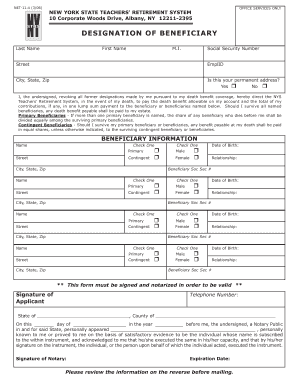
- Begin by entering your last name, first name, and middle initial in the corresponding fields. Ensure that your entries are accurate to avoid any discrepancies.
- Provide your Social Security number. This information is essential for the identification of your account.
- Next, enter your street address, including city, state, and zip code. Confirm that this is your permanent address and select 'Yes' or 'No' accordingly.
- Proceed to the primary beneficiaries section. Enter the name, relationship, date of birth, and Social Security number for each primary beneficiary. If you have more than one, ensure that the share is noted as equally distributed.
- If applicable, fill in the contingent beneficiaries section with the same details as provided for primary beneficiaries. Remember that contingent beneficiaries will only receive benefits if primary beneficiaries are not alive.
- Review the additional instructions provided on the form to ensure compliance with all requirements, including notarization.
- Sign and date the form in the designated area to validate your designation.
- Contact a notary public to notarize the form, as this step is essential for the form’s validity.
- After completing your form, save your changes, and if needed, download or print a copy for your records before submission.
Complete your beneficiary designation forms online today to ensure your retirement benefits are well managed.
Your retirement number can be found on any documentation related to your retirement plan, such as membership cards or furlough notices. In case you cannot locate these, reaching out to NYSTRS is a straightforward option. Their customer service can provide direct assistance in retrieving your number. For additional resources, visit Last Name Street - Nystrs for helpful links.