Get Bcbsm Alphanumeric Contract Number Form
How it works
-

Open form follow the instructions
-

Easily sign the form with your finger
-

Send filled & signed form or save
How to fill out the Bcbsm alphanumeric contract number form online
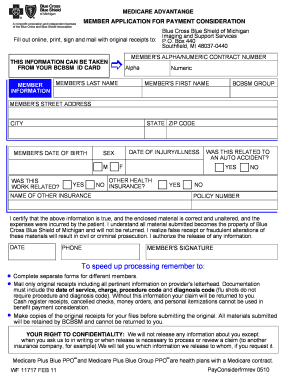
The Bcbsm alphanumeric contract number form is essential for efficient processing of member applications for payment consideration. Filling it out accurately ensures that your information is correctly submitted for consideration. Follow the steps outlined below for assistance in completing the form online.
Follow the steps to fill out the form online:
- Click the ‘Get Form’ button to obtain the form and open it in your editor.
- Begin with the member information section. Carefully input your personal details as they appear on your BCBSM ID card. This includes your full name, member ID, and any other identifiable information.
- In the subsequent sections, provide relevant information related to the date of service, charge, procedure code, and diagnosis code. Ensure these entries are accurate to avoid processing delays.
- Review all filled sections carefully to confirm that the information is correct and complete. Ensuring accuracy will facilitate smooth processing.
- Once you have confirmed your entries, you can either save the changes to your form, download a copy for your records, print it for submission, or share it as needed.
Complete your documents online for efficient processing.
To obtain prior authorization from Blue Cross Blue Shield of Michigan, you can call their dedicated service number, which is often provided on your insurance card or their official website. It is essential to have your Bcbsm Alphanumeric Contract Number Form handy when you call, as it will help facilitate the conversation and lead to quicker responses. Remember, having your contract details ready can make the prior authorization process smooth and efficient.