We use cookies to improve security, personalize the user experience, enhance our marketing activities (including cooperating with our marketing partners) and for other business use.
Click "here" to read our Cookie Policy. By clicking "Accept" you agree to the use of cookies. Read less
Read more
Accept
Loading
Form preview
  • US Legal Forms
  • Form Library
  • More Forms
  • More Uncategorized Forms
  • Know Your Customer (kyc) Application Form (for Non-individuals ...

Get Know Your Customer (kyc) Application Form (for Non-individuals ...

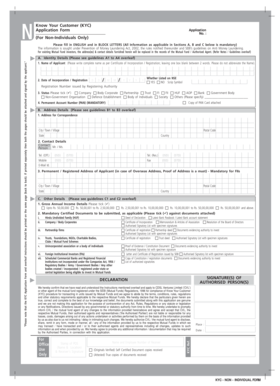
N Know Your Customer (KYC) Application Form Application No. : (For Non-Individuals Only) Please fill in ENGLISH and in BLOCK LETTERS (All Information as applicable in Sections A, B and C below is.

How it works

  1. Open form

    Open form follow the instructions

  2. Easily sign form

    Easily sign the form with your finger

  3. Share form

    Send filled & signed form or save

How to fill out the Know Your Customer (KYC) Application Form (For Non-Individuals) online

The Know Your Customer (KYC) Application Form is essential for non-individual entities wishing to comply with regulatory requirements. This guide provides clear and comprehensive steps to assist users in accurately completing the form online.

Follow the steps to complete the KYC Application Form successfully.

  1. Press the ‘Get Form’ button to access the KYC Application Form and open it using your preferred online document management tool.
  2. Enter the name of the applicant in block letters as per the Certificate of Incorporation or Registration. Ensure that two words are separated by a blank box without abbreviations.
  3. Fill in the date of incorporation/registration in the specified format (DD/MM/YYYY). If applicable, indicate if the entity is listed on the NSE by selecting ‘YES’ or ‘NO’, and note the scrip symbol.
  4. Select the status of the entity by ticking the appropriate box, such as Company, Partnership, Trust, or any other applicable category.
  5. Enter the Permanent Account Number (PAN) of the entity, which is mandatory. Attach a self-attested photocopy of the PAN card.
  6. In the address section, provide the correspondence address, city, postal code, state, and country. This address will replace any existing information in the records.
  7. Complete the contact details section with a contact person's name, phone numbers (office and residence), mobile number, email address, and fax number.
  8. Provide the permanent or registered address of the applicant, especially if it is an overseas address, and ensure proof of address is attached if applicable.
  9. Indicate the annual income by ticking the appropriate income bracket to provide a clear picture of the entity's financial standing.
  10. Select and ensure all mandatory certified documents are attached, including those specific to company structures, partnerships, trusts, or Foreign Institutional Investors, depending on the type of entity.
  11. Sign the declaration section, confirming that the details provided are accurate and you understand and agree to the terms outlined in the form.
  12. After verifying all information and ensuring completeness, submit the form along with the necessary documents at a designated Point of Service (PoS). Retain a photocopy of the completed form for your records.

Complete your KYC Application Form online now to ensure compliance and facilitate your investment process.

Get form

Experience a faster way to fill out and sign forms on the web. Access the most extensive library of templates available.
Get form

Related content

List of Approved KYC Rules | Internal Revenue...
Revenue Procedure 2000-12 PDF states that the IRS will not enter into a qualified ... This...
Learn more
(PDF) FIDELITY -INDIVIDUAL KYC FORM Know Your...
I Know Your Client (KYC) Application Form (For Individuals Only) Please fill this form in...
Learn more
FOREIGN EXCHANGE DEPARTMENT Master Circular on ...
RBI/2013-14/10 Master Circular No. ... of its subsidiaries, companies in the same group...
Learn more

Related links form

Failure Prosecute Gift Card Acknowledgement Form Addition Of Name Form - Victoria Mutual Building Society 24 Hour Notice To Enter Property

Questions & Answers

Get answers to your most pressing questions about US Legal Forms API.

Contact support

Filing a KYC form generally involves completing the relevant sections of the application and attaching necessary identity and address documents. You can file the Know Your Customer (KYC) Application Form (For Non-Individuals) online or in person at your financial institution. Check if your institution offers an e-filing option, as it often makes the process faster and more efficient. Once you have submitted your form, track its status for peace of mind.

You can submit a KYC application by either visiting your bank or financial institution's website or by going to a branch office. Most institutions nowadays provide an online submission option for the Know Your Customer (KYC) Application Form (For Non-Individuals). Simply follow the prompts on the website, attach the necessary documents, and hit submit to complete the process. Make sure to keep a copy of your submission for your records.

The KYC process involves verifying the identity of clients to assess and manage risks. Generally, it starts with submitting the Know Your Customer (KYC) Application Form (For Non-Individuals), alongside relevant identification documents. Once your application is submitted, the institution will review your information and might conduct additional checks to ensure compliance with regulations. A successful KYC process not only enhances security but also builds trust in financial transactions.

You will typically receive a confirmation notification from your financial institution once your Know Your Customer (KYC) Application Form is verified. You can also check your KYC status through your online account dashboard. If you have concerns, it's best to reach out to customer service for additional confirmation.

To check if your KYC status reflects your non-resident status, you can log into your banking account if you have online access. Alternatively, directly contacting customer support can provide clarification on your KYC classification. It’s crucial to confirm this for compliance purposes.

You can obtain the e-KYC form by visiting the official website of your financial institution or service provider. Look for the KYC section, where they usually provide downloadable forms. Ensure you provide the necessary information accurately to facilitate the KYC process.

Checking if your KYC status is categorized as non-resident can usually be done through your online banking platform. Your account details may specify your residency status. If you're uncertain, reach out to customer service for clarification and ensure your status aligns with your situation.

To verify if your KYC is active, log into your online account with your financial institution, where you can typically find KYC status information. Alternatively, you can contact customer support for assistance. This ensures that you remain compliant and can continue enjoying financial services without interruptions.

You can obtain your Know Your Customer (KYC) Application Form by requesting it from your bank or service provider. Many institutions provide digital copies through their customer portals, allowing you to download the necessary documents easily. If you prefer physical copies, you can visit a branch or contact customer service.

To check your KYC status as a non-resident, log into your financial institution's online platform, where you should find options for tracking your application. You may also receive status updates via email or phone, depending on the institution's protocols. If you have concerns about your status, contacting customer support can clarify your situation easily.

Get This Form Now!

Use professional pre-built templates to fill in and sign documents online faster. Get access to thousands of forms.
Get form
If you believe that this page should be taken down, please follow our DMCA take down processhere.

Industry-leading security and compliance

US Legal Forms protects your data by complying with industry-specific security standards.
  • In businnes since 1997
    25+ years providing professional legal documents.
  • Accredited business
    Guarantees that a business meets BBB accreditation standards in the US and Canada.
  • Secured by Braintree
    Validated Level 1 PCI DSS compliant payment gateway that accepts most major credit and debit card brands from across the globe.
Get Know Your Customer (KYC) Application Form (For Non-Individuals ...
Get form
Form Packages
Adoption
Bankruptcy
Contractors
Divorce
Home Sales
Employment
Identity Theft
Incorporation
Landlord Tenant
Living Trust
Name Change
Personal Planning
Small Business
Wills & Estates
Packages A-Z
Form Categories
Affidavits
Bankruptcy
Bill of Sale
Corporate - LLC
Divorce
Employment
Identity Theft
Internet Technology
Landlord Tenant
Living Wills
Name Change
Power of Attorney
Real Estate
Small Estates
Wills
All Forms
Forms A-Z
Form Library
Customer Service
Terms of Service
Privacy Notice
Legal Hub
Content Takedown Policy
Bug Bounty Program
About Us
Help Portal
Legal Resources
Blog
Affiliates
Contact Us
Delete My Account
Site Map
Industries
Forms in Spanish
Localized Forms
State-specific Forms
Forms Kit
Legal Guides
Real Estate Handbook
All Guides
Prepared for You
Notarize
Incorporation services
Our Customers
For Consumers
For Small Business
For Attorneys
Our Sites
US Legal Forms
USLegal
FormsPass
pdfFiller
signNow
airSlate WorkFlow
DocHub
Instapage
Social Media
Call us now toll free:
+1 833 426 79 33
As seen in:
  • USA Today logo picture
  • CBC News logo picture
  • LA Times logo picture
  • The Washington Post logo picture
  • AP logo picture
  • Forbes logo picture
© Copyright 1997-2025
airSlate Legal Forms, Inc.
3720 Flowood Dr, Flowood, Mississippi 39232
Form Packages
Adoption
Bankruptcy
Contractors
Divorce
Home Sales
Employment
Identity Theft
Incorporation
Landlord Tenant
Living Trust
Name Change
Personal Planning
Small Business
Wills & Estates
Packages A-Z
Form Categories
Affidavits
Bankruptcy
Bill of Sale
Corporate - LLC
Divorce
Employment
Identity Theft
Internet Technology
Landlord Tenant
Living Wills
Name Change
Power of Attorney
Real Estate
Small Estates
Wills
All Forms
Forms A-Z
Form Library
Customer Service
Terms of Service
Privacy Notice
Legal Hub
Content Takedown Policy
Bug Bounty Program
About Us
Help Portal
Legal Resources
Blog
Affiliates
Contact Us
Delete My Account
Site Map
Industries
Forms in Spanish
Localized Forms
State-specific Forms
Forms Kit
Legal Guides
Real Estate Handbook
All Guides
Prepared for You
Notarize
Incorporation services
Our Customers
For Consumers
For Small Business
For Attorneys
Our Sites
US Legal Forms
USLegal
FormsPass
pdfFiller
signNow
airSlate WorkFlow
DocHub
Instapage
Social Media
Call us now toll free:
+1 833 426 79 33
As seen in:
  • USA Today logo picture
  • CBC News logo picture
  • LA Times logo picture
  • The Washington Post logo picture
  • AP logo picture
  • Forbes logo picture
© Copyright 1997-2025
airSlate Legal Forms, Inc.
3720 Flowood Dr, Flowood, Mississippi 39232