Get Bollinger Claims Administrator Form
How it works
-

Open form follow the instructions
-

Easily sign the form with your finger
-

Send filled & signed form or save
How to fill out the Bollinger Claims Administrator Form online
Filling out the Bollinger Claims Administrator Form online can seem daunting, but with this guide, you will be equipped with all the necessary steps to complete it accurately and effectively. This comprehensive guide will walk you through each section of the form to ensure a smooth submission process.
Follow the steps to complete the form with ease.
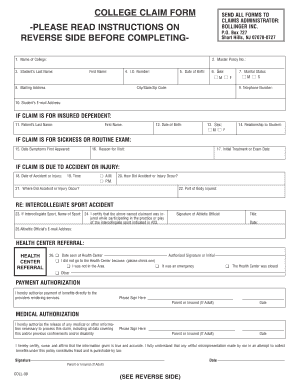
- Click 'Get Form' button to access the Bollinger Claims Administrator Form and open it in your preferred document editor.
- Begin filling out the form by entering the name of your college in the designated field (field 1).
- Input the Master Policy Number (field 2) that corresponds to your insurance policy.
- Fill in the student's last name and first name (fields 3) as it appears on official documents.
- Provide the student’s identification number (field 4) allocated by the institution.
- Enter the student's date of birth (field 5) in the specified format.
- Select the student's sex (field 6) by marking the appropriate box.
- Complete the mailing address section (field 8) including city, state, and zip code.
- Fill in the marital status (field 7) by marking ‘M’ for married or ‘S’ for single.
- Provide the student's telephone number (field 9) and email address (field 10).
- If the claim is for an insured dependent, fill in their last name and first name (fields 11).
- Provide the date of birth for the dependent (field 12) in the format specified.
- Indicate the dependent's sex (field 13) by selecting the relevant option.
- State the relationship to the student (field 14).
- If applicable, enter the date symptoms first appeared (field 15) related to sickness or routine exam claims.
- Specify the reason for the visit (field 16) to the healthcare provider.
- Record the date of the initial treatment or examination (field 17).
- For accidents or injuries, provide the date (field 18) of the incident.
- Indicate the time of the accident (field 19) by selecting AM or PM.
- Describe how the accident or injury occurred (field 20).
- State where the accident or injury took place (field 21).
- Specify the part of the body injured (field 22).
- If the claim is related to intercollegiate sports, enter the name of the sport (field 23).
- An athletic official must sign and provide their title and date (field 24) if relating to sports injuries.
- Input the athletic official’s email address (field 25).
- If applicable, indicate the date seen at the health center (field 26) and provide the authorized signature.
- Complete the health center referral section by indicating reasons if the health center was not visited.
- Authenticate payment authorization by signing the designated section for parents or insured adults.
- Complete the medical authorization section by signing to agree to the release of necessary information.
- Affirm the accuracy of the information provided by signing and dating the final section.
- Fill out the statement of other insurance section, if applicable, to specify any additional coverage.
- Review all completed fields for accuracy and completeness to prevent processing delays.
- Once satisfied, you can save changes, download, print, or share the completed form as needed.
Start completing the Bollinger Claims Administrator Form online now to ensure your claims are processed efficiently.
The insurance claim form is a structured document that policyholders fill out to request payment for a covered loss or damage. The Bollinger Claims Administrator Form is one example, designed to simplify this process. By accurately completing this form, you can ensure that your insurer fully understands your situation, leading to a more efficient claims experience.