Loading
Form preview
  • US Legal Forms
  • Other Templates
  • More Forms
  • More Uncategorized Forms
  • Trustmark Disability Claim Form

Get Trustmark Disability Claim Form

Ss 1 2 3 4 5 - No limitation of functional capacity; capable of heavy work*. No restrictions. (0-10%) Medium manual activity*. (15 - 30%) Slight limitation of functional capacity; capable of light work*. (35 - 55%) Moderate limitation of functional capacity; capable of clerical/administrative (sedentary*) activity. (60 - 70%) Severe limitation of functional capacity; incapable of minimum (sedentary*) activity. (75 - 100%) Remarks: (b) Mental Impairments (If Applicable) (a) Please define s.

How it works

  1. Open form

    Open form follow the instructions

  2. Easily sign form

    Easily sign the form with your finger

  3. Share form

    Send filled & signed form or save

How to fill out the Trustmark Disability Claim Form online

Filling out the Trustmark Disability Claim Form online can be a straightforward process when approached step-by-step. This guide provides detailed instructions to help users accurately complete each section of the form and ensure all necessary information is included.

Follow the steps to complete the Trustmark Disability Claim Form online.

  1. Press ‘Get Form’ button to acquire the form and unload it in the editor.
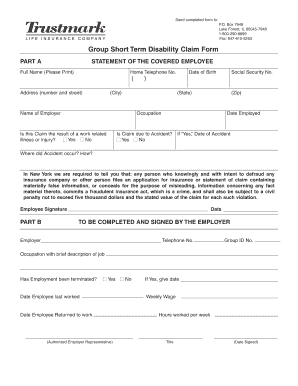
  2. Begin with Part A, where you will enter the personal details of the covered employee. Complete fields for full name, home telephone number, address, occupation, date of birth, and social security number.
  3. Indicate if the claim is due to a work-related illness or injury by selecting 'Yes' or 'No'.
  4. Provide the name of the employer, date employed, and if the claim is due to an accident, specify the date and location of the accident.
  5. Sign the form in the designated area and include the date to confirm the accuracy of the information provided.
  6. Proceed to Part B, where the employer must complete their section. They will provide details such as the employer's name, telephone number, group ID number, and a brief description of the employee's occupation.
  7. The employer must indicate if employment has been terminated. If so, record the date the employee last worked and when they returned to work, along with the employee's weekly wage.
  8. Complete the Attending Physician’s Statement section. The physician will need to provide the patient's diagnosis, condition history, results of physical exams, and any treatments prescribed.
  9. The physician should include relevant information about the patient's functional capacity and limitations.
  10. Fill out the Authorization to Disclose/Release or Obtain Medical Records, ensuring the patient’s name, address, and date of birth are complete.
  11. Finalize by reviewing all entered information for accuracy. Users can save changes, download the form, print it, or share it as required before submission.

Complete your Trustmark Disability Claim Form online today for swift processing of your claim.

Get form

Experience a faster way to fill out and sign forms on the web. Access the most extensive library of templates available.
Get form

Related content

Trustmark short term disability claim form
Trustmark Insurance, 100 North Parkway, Suite 200, Worcester, MA 01605. Phone:...
Learn more
Healthcare Claims for Faculty & Staff | The Cooper...
Claim Instructions. In-Network Medical Claims. In-network claims should be submitted to...
Learn more
Honores de Año Nuevo 2015 - 2015 New Year Honours...
Jun 17, 2020 — Nicholas George Cooper - Presidente de Sterling Insurance Group Ltd. Para...
Learn more

Related links form

TX Longview Independent School District Paraprofessional Performance Evaluation Form 2019 TX Wickson Creek Special Utility District Service Application 2014 TX Arlington Turkey Trot Sponsorship Proposal 2019 TX Agencia De Educacion Cuestionario De Informacion De Datos Raciales Y De Etnicidad De Estudiantes 2010

Questions & Answers

Get answers to your most pressing questions about US Legal Forms API.

Contact support

The time it takes for an insurance claim to go through varies by provider but is generally between 2 to 6 weeks. After submitting your Trustmark Disability Claim Form, the review process begins promptly. For a smoother experience, stay engaged and check for updates on your claim's status regularly.

To claim total disability, fill out the Trustmark Disability Claim Form and include all necessary medical documentation that supports your claim. Ensure you provide comprehensive information regarding your condition and its impact on your work. Getting assistance from uslegalforms can simplify this process and ensure you don't miss critical details.

Trustmark generally takes about 10 to 14 business days to process claims after receiving your Trustmark Disability Claim Form. This timeframe may extend based on the complexity of your case. Regularly checking the status of your claim can provide useful updates.

Filling in a Trustmark Disability Claim Form requires careful attention to detail. Start by providing accurate personal information, including your contact details and policy number. If you need guidance, uslegalforms offers resources that help you understand each section of the claim form.

Typically, the processing time for claims can vary based on specific circumstances. However, once you submit your Trustmark Disability Claim Form, expect a response within a few weeks. Staying informed through the Trustmark site can help you track your claim progress.

Trustmark insurance offers a variety of benefits, including comprehensive coverage options tailored to your needs. Policyholders appreciate the flexibility of their plans, which can cover various aspects such as health, life, and disability. Trustmark also provides excellent customer support throughout the claims process, ensuring you feel supported during challenging times. Their long-standing reputation reflects reliability and trust, allowing you to have peace of mind.

You can obtain a Trustmark Disability Claim Form by visiting their website or contacting customer service for assistance. The form is readily available online, making it convenient for you to start your claim. After filling out the form, ensure you attach any required documents to support your claim. For ease, consider using US Legal Forms to access the necessary forms and receive guidance on completing your claim.

To cancel your Trustmark life insurance, you need to contact their customer service directly or visit their official website. It’s important to have your policy information ready, which makes the cancellation process smoother. Make sure to inquire about any potential refunds or implications of cancelling your policy. Completing the cancellation is a straightforward process, ensuring you remain informed throughout.

Yes, Trustmark is a reputable insurance provider that offers various financial products, including disability insurance. Their plans are designed to provide financial support when you need it most. Trustmark has a strong reputation for their claims process, which includes utilizing the Trustmark Disability Claim Form. Understanding Trustmark's offerings will help you make informed decisions about your insurance needs.

Send to: Phone:(800) 433-3036. Fax:(866) 849-2970. Email: groupclaimfiling@aflac.com.

Get This Form Now!

Use professional pre-built templates to fill in and sign documents online faster. Get access to thousands of forms.
Get form
If you believe that this page should be taken down, please follow our DMCA take down processhere.
Get Trustmark Disability Claim Form
Get form
  • Adoption
  • Bankruptcy
  • Contractors
  • Divorce
  • Home Sales
  • Employment
  • Identity Theft
  • Incorporation
  • Landlord Tenant
  • Living Trust
  • Name Change
  • Personal Planning
  • Small Business
  • Wills & Estates
  • Packages A-Z
  • Affidavits
  • Bankruptcy
  • Bill of Sale
  • Corporate - LLC
  • Divorce
  • Employment
  • Identity Theft
  • Internet Technology
  • Landlord Tenant
  • Living Wills
  • Name Change
  • Power of Attorney
  • Real Estate
  • Small Estates
  • Wills
  • All Forms
  • Forms A-Z
  • Other Templates
  • Legal Hub
  • About Us
  • Help Portal
  • Legal Resources
  • Blog
  • Affiliates
  • Contact Us
  • Delete My Account
  • Site Map
  • Industries
  • Forms in Spanish
  • Localized Forms
  • State-specific Forms
  • Forms Kit
  • Real Estate Handbook
  • All Guides
  • Notarize
  • Incorporation services
  • For Consumers
  • For Small Business
  • For Attorneys
  • USLegal
  • FormsPass
  • pdfFiller
  • signNow
  • altaFlow
  • DocHub
  • Instapage
Form Packages
  • Adoption
  • Bankruptcy
  • Contractors
  • Divorce
  • Home Sales
  • Employment
  • Identity Theft
  • Incorporation
  • Landlord Tenant
  • Living Trust
  • Name Change
  • Personal Planning
  • Small Business
  • Wills & Estates
  • Packages A-Z
Form Categories
  • Affidavits
  • Bankruptcy
  • Bill of Sale
  • Corporate - LLC
  • Divorce
  • Employment
  • Identity Theft
  • Internet Technology
  • Landlord Tenant
  • Living Wills
  • Name Change
  • Power of Attorney
  • Real Estate
  • Small Estates
  • Wills
  • All Forms
  • Forms A-Z
  • Other Templates
Customer Service
  • Legal Hub
  • About Us
  • Help Portal
  • Legal Resources
  • Blog
  • Affiliates
  • Contact Us
  • Delete My Account
  • Site Map
  • Industries
  • Forms in Spanish
  • Localized Forms
  • State-specific Forms
  • Forms Kit
Legal Guides
  • Real Estate Handbook
  • All Guides
Prepared for you
  • Notarize
  • Incorporation services
Our Customers
  • For Consumers
  • For Small Business
  • For Attorneys
Our Sites
  • USLegal
  • FormsPass
  • pdfFiller
  • signNow
  • altaFlow
  • DocHub
  • Instapage
Social Media
Call us now toll free:
+1 833 426 79 33
As seen in:
© Copyright 1999-2026 airSlate Legal Forms, Inc. 17 Station Street, Ste. 203, Brookline, MA 02445
  • Your Privacy Choices
  • Terms of Service
  • Privacy Notice
  • Content Takedown Policy
  • Bug Bounty Program