Loading
Form preview
  • US Legal Forms
  • Other Templates
  • More Forms
  • More Uncategorized Forms
  • Instrumental Form To Fill

Get Instrumental Form To Fill

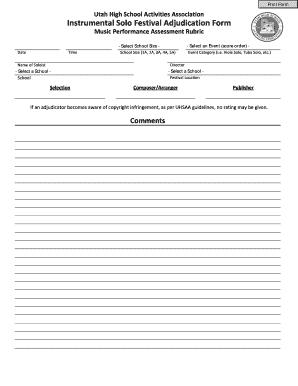
Order) - - Select School Size Date Time School Size (1A, 2A, 3A, 4A, 5A) Name of Soloist Event Category (i.e. Viola Solo, Tuba Solo, etc.) Director - Select a School - - Select a School School Selection Festival Location Composer/Arranger Publisher If an adjudicator becomes aware of copyright infringement, as per UHSAA guidelines, no rating may be given. Comments Instrumental Solo Performance Assessment Rubric Name of Soloist Selection School Director Circle the appropriate.

How it works

  1. Open form

    Open form follow the instructions

  2. Easily sign form

    Easily sign the form with your finger

  3. Share form

    Send filled & signed form or save

How to fill out the Instrumental Form To Fill online

The Instrumental Form To Fill is a crucial document for music performance assessments, specifically tailored for adjudicating solo performances. This guide will provide clear instructions on how to complete this form effectively and accurately online.

Follow the steps to complete the Instrumental Form To Fill online.

  1. Press the ‘Get Form’ button to access the Instrumental Form To Fill and open it for editing.
  2. Select the event from the dropdown menu, ensuring the chosen event aligns with the performance being evaluated.
  3. Choose the appropriate school size from the available options (1A, 2A, 3A, 4A, 5A). This information helps categorize the performance within the correct context.
  4. Enter the date and time of the performance to document when the assessment took place.
  5. Fill in the name of the soloist and the event category (e.g., Viola Solo, Tuba Solo, etc.) to clearly identify who is being assessed.
  6. Provide the name of the director responsible for the performance to ensure proper attribution.
  7. Select the school from the list provided, which ensures the adjudication is recorded correctly.
  8. Input the selection being performed, along with the composer's name and the publisher's name for a complete citation of the work.
  9. Make sure to add any comments or notes pertinent to the adjudication process, especially if there are concerns about copyright compliance.
  10. After filling out all necessary fields, review the form for accuracy, and then save your changes, download, print, or share the completed form as needed.

Complete your Instrumental Form To Fill online today for a seamless adjudication process.

Get form

Experience a faster way to fill out and sign forms on the web. Access the most extensive library of templates available.
Get form

Related content

Circular 50 Copyright Registration for Musical...
does not cover a recorded performance of that composition. ... musical composition can be...
Learn more
Student Forms: Music - Willamette University
Click on the form's name for a link to fill it out and a more detailed description of...
Learn more
Sheet music - Wikipedia
Sheet music is a handwritten or printed form of musical notation that uses musical symbols...
Learn more

Related links form

Authorized Signatory Letter TRANSFUSION REACTION REPORTING FORM FOR BLOOD BLOOD PRODUCTS - Ipc Nic High School Team Table Tennis Tournament Project 5 Unit 1 Test

Questions & Answers

Get answers to your most pressing questions about US Legal Forms API.

Contact support

Turning a song into an instrumental version often involves isolating the vocal tracks and enhancing the instrumental backing. You can use audio editing software to remove vocals and emphasize musical components. Alternatively, you can seek out official instrumental versions or remixes. Such resources can help you find the appropriate instrumental form to fill your needs.

To get permission to use an instrumental, first identify the copyright owner of the work. You can often find this information through music licensing platforms or the publisher. Once identified, reach out to them with your request, outlining how you intend to use the piece. This process ensures you legally obtain the right to use the instrumental form to fill your project.

The main difference between a song and an instrumental piece lies in the presence of lyrics. A song features vocals that convey a message, while an instrumental piece focuses solely on musical elements. This allows instrumental compositions to explore a wider range of emotions and ideas through instruments. Understanding these distinctions can help you appreciate the power of the instrumental form to fill artistic expression.

To write an instrumental melody, start by choosing a mood or emotion you want to convey. Use instruments that best match that mood and create a simple melodic line that captures your idea. Keep experimenting with rhythm and pitch until the melody feels right. Lastly, consider how this melody can fit into the instrumental form to fill your creative vision.

When filling in a form, remember to read the instructions fully, gather all necessary information beforehand, fill it out accurately, review your entries for any mistakes, and submit it in the required format. These steps ensure you submit an effective instrumental form to fill and minimize any likelihood of errors. Following this routine can simplify the process significantly.

Completing a fillable form is simple with the right approach. Begin by downloading the form and opening it in a compatible program. Fill in the necessary fields using clear and concise information. If you encounter any issues, refer to the guidelines provided, as they can help you successfully complete your instrumental form to fill.

To fill a form in English, ensure that you understand the questions and are comfortable with English vocabulary. If needed, consult a translation tool or someone fluent to help interpret complex phrases. Make use of straightforward language and stick to basic vocabulary. Platforms like US Legal Forms often provide the necessary language support for filling out instrumental forms to fill.

Filling in a form for kids requires a simplified approach. Use clear, simple language and ensure the instructions are straightforward. Encourage the child to provide their information with assistance from an adult if needed. This process can be engaging if you relate it to fun activities, especially when filling out an instrumental form to fill.

To convert audio into instrumental, you typically use specialized software that separates vocals from music tracks. Look for online tools or applications that provide an audio processing feature. Once you have the instrumental version, you can create an instrumental form to fill corresponding to the song’s rights for distribution or performance. This way, you ensure you're on the right side of legality.

Properly filling out an instrumental form to fill involves understanding the requirements and layout of the form. Take your time to enter each piece of information carefully. Don't skip any sections, and always cross-check for errors. If you're using an online platform like US Legal Forms, the system can guide you through each section efficiently.

Get This Form Now!

Use professional pre-built templates to fill in and sign documents online faster. Get access to thousands of forms.
Get form
If you believe that this page should be taken down, please follow our DMCA take down processhere.
Get Instrumental Form To Fill
Get form
  • Adoption
  • Bankruptcy
  • Contractors
  • Divorce
  • Home Sales
  • Employment
  • Identity Theft
  • Incorporation
  • Landlord Tenant
  • Living Trust
  • Name Change
  • Personal Planning
  • Small Business
  • Wills & Estates
  • Packages A-Z
  • Affidavits
  • Bankruptcy
  • Bill of Sale
  • Corporate - LLC
  • Divorce
  • Employment
  • Identity Theft
  • Internet Technology
  • Landlord Tenant
  • Living Wills
  • Name Change
  • Power of Attorney
  • Real Estate
  • Small Estates
  • Wills
  • All Forms
  • Forms A-Z
  • Other Templates
  • Legal Hub
  • About Us
  • Help Portal
  • Legal Resources
  • Blog
  • Affiliates
  • Contact Us
  • Delete My Account
  • Site Map
  • Industries
  • Forms in Spanish
  • Localized Forms
  • State-specific Forms
  • Forms Kit
  • Real Estate Handbook
  • All Guides
  • Notarize
  • Incorporation services
  • For Consumers
  • For Small Business
  • For Attorneys
  • USLegal
  • FormsPass
  • pdfFiller
  • signNow
  • altaFlow
  • DocHub
  • Instapage
Form Packages
  • Adoption
  • Bankruptcy
  • Contractors
  • Divorce
  • Home Sales
  • Employment
  • Identity Theft
  • Incorporation
  • Landlord Tenant
  • Living Trust
  • Name Change
  • Personal Planning
  • Small Business
  • Wills & Estates
  • Packages A-Z
Form Categories
  • Affidavits
  • Bankruptcy
  • Bill of Sale
  • Corporate - LLC
  • Divorce
  • Employment
  • Identity Theft
  • Internet Technology
  • Landlord Tenant
  • Living Wills
  • Name Change
  • Power of Attorney
  • Real Estate
  • Small Estates
  • Wills
  • All Forms
  • Forms A-Z
  • Other Templates
Customer Service
  • Legal Hub
  • About Us
  • Help Portal
  • Legal Resources
  • Blog
  • Affiliates
  • Contact Us
  • Delete My Account
  • Site Map
  • Industries
  • Forms in Spanish
  • Localized Forms
  • State-specific Forms
  • Forms Kit
Legal Guides
  • Real Estate Handbook
  • All Guides
Prepared for you
  • Notarize
  • Incorporation services
Our Customers
  • For Consumers
  • For Small Business
  • For Attorneys
Our Sites
  • USLegal
  • FormsPass
  • pdfFiller
  • signNow
  • altaFlow
  • DocHub
  • Instapage
Social Media
Call us now toll free:
+1 833 426 79 33
As seen in:
© Copyright 1999-2026 airSlate Legal Forms, Inc. 17 Station Street, Suite 303, Brookline, MA 02445
  • Your Privacy Choices
  • Terms of Service
  • Privacy Notice
  • Content Takedown Policy
  • Bug Bounty Program