Loading
Get Refund Status
How it works
-

Open form follow the instructions
-

Easily sign the form with your finger
-

Send filled & signed form or save
How to fill out the Refund Status online
This guide provides clear instructions on how to fill out the Refund Status form online. By following these steps, users will be able to successfully complete and submit their refund request with confidence.
Follow the steps to complete the Refund Status form online:
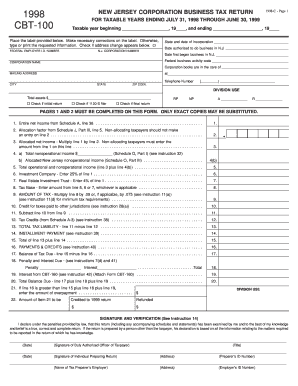
- Use the ‘Get Form’ button to obtain the Refund Status form. This will allow you to access the form in an editable format.
- Begin by filling in the taxable year information. Enter the beginning and ending dates of the taxable period you are addressing.
- Correct the pre-printed label details. If the address on the label is incorrect, make the necessary changes directly on the form.
- Enter your Federal Employer Identification Number and New Jersey Corporation Number as requested in the designated fields.
- Provide the corporation's name as it appears on the official documents. Make sure to check for spelling accuracy.
- Complete the information regarding the corporation’s authorized business dates in New Jersey, including incorporation and operational start dates.
- Fill in the federal business activity code that corresponds with your corporation’s primary business operations.
- Provide a contact mailing address, including telephone number, city, state, and ZIP code for all communications related to this filing.
- Complete the financial information section, starting with total assets and check any applicable boxes indicating special conditions (like if it’s a final return).
- Proceed with listing the entire net income and the allocation factor as indicated in the subsequent lines of the form.
- Multiply the net income by the allocation factor where required and continue completing the other income and tax-related entries in the corresponding lines.
- Ensure that all information is accurately filled out, then review the entire form for errors or omissions before finalizing.
- Once completed, you can save the changes made to the form, and choose to download, print, or share the finished document as needed.
Take the next step and complete the Refund Status form online to facilitate your refund process.
To get your refund status, you can use the IRS 'Where's My Refund?' tool by visiting their website. Provide your Social Security number, filing status, and refund amount to receive up-to-date information. This efficient tool simplifies tracking your refund status, giving you peace of mind throughout the process.