Loading
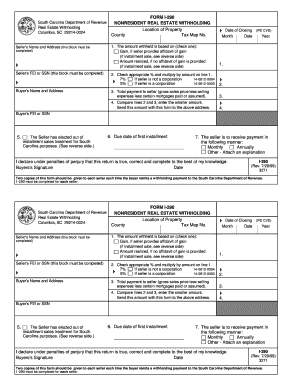
Get South Carolina Nonresident Real Estate Withholding Form
How it works
-

Open form follow the instructions
-

Easily sign the form with your finger
-

Send filled & signed form or save
How to fill out the South Carolina Nonresident Real Estate Withholding Form online
The South Carolina Nonresident Real Estate Withholding Form is essential for individuals making payments to nonresident sellers for real property transactions. This guide will provide you with clear, step-by-step instructions on how to accurately complete the form online, ensuring you meet all necessary requirements.
Follow the steps to successfully fill out the form online:
- Click the ‘Get Form’ button to obtain the South Carolina Nonresident Real Estate Withholding Form and open it in your chosen editor.
- Complete the seller's name and address section. Ensure all fields are filled accurately as this information is crucial for identification.
- Enter the seller's federal employer identification number (FEI) or social security number (SSN). This block must be completed for proper tax processing.
- Specify the location of the property, including the county and tax map number, to identify the property involved in the transaction.
- Select the method for calculating the amount withheld by checking the appropriate box: either based on gain (if an affidavit of gain is provided) or amount realized (if no affidavit is given).
- Record the date of closing, indicating month, day, and year to establish the timeline of the transaction.
- Calculate the withholding amount using the percentages provided—7% if the seller is not a corporation, and 5% if the seller is a corporation. Multiply this rate by the amount determined in step 5.
- Document the total payment to the seller, factoring in gross sales price, selling expenses, and any mortgages paid or assumed.
- Compare the amounts from step 7 and step 8, and enter the smaller of the two on the form. This is the amount to be submitted with the form.
- Fill in the buyer's FEI or SSN for their identification as part of the transaction.
- If applicable, check the box indicating whether the seller has elected out of installment sales treatment.
- Specify the due date of the first installment, if relevant, and indicate the preferred method of payment (monthly, annually, or other).
- Review the form for accuracy and completeness. Ensure the buyer signs and dates the declaration stating that the information is true and correct.
- Once complete, you can save changes, download, print, or share the form as needed, ensuring you follow the proper submission guidelines.
Complete your South Carolina Nonresident Real Estate Withholding Form online today!
The non-resident withholding tax rate in South Carolina is currently set at 7%. This rate applies to the sale of real estate by non-resident sellers. Therefore, understanding this rate is essential for accurate tax reporting. You can find more details on the South Carolina Nonresident Real Estate Withholding Form provided on our platform.
Industry-leading security and compliance
US Legal Forms protects your data by complying with industry-specific security standards.
-
In businnes since 199725+ years providing professional legal documents.
-
Accredited businessGuarantees that a business meets BBB accreditation standards in the US and Canada.
-
Secured by BraintreeValidated Level 1 PCI DSS compliant payment gateway that accepts most major credit and debit card brands from across the globe.