Get Odu Undergraduate Reactivationreadmission Form
How it works
-

Open form follow the instructions
-

Easily sign the form with your finger
-

Send filled & signed form or save
How to fill out the Odu Undergraduate Reactivationreadmission Form online
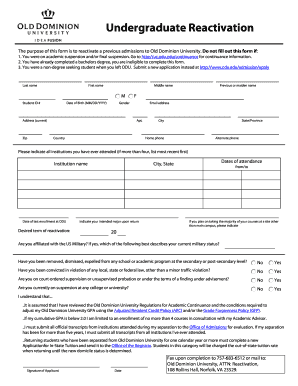
This guide provides step-by-step instructions to assist users in completing the Odu Undergraduate Reactivationreadmission Form online. By following these instructions, individuals seeking to reactivate their admissions can ensure that all necessary information is accurately provided.
Follow the steps to successfully complete the form:
- Press the ‘Get Form’ button to acquire the form and open it for completion.
- Enter your last name, first name, and middle name in the designated fields. Additionally, include your student ID number and date of birth in the specified format (MM/DD/YYYY).
- Provide your current zip code, email address, and phone numbers (home and alternate) under the respective sections.
- Fill in your current address, including street, apartment number (if applicable), city, state/province, and country.
- If applicable, indicate your previous or maiden name in the designated field.
- List all institutions you have attended, prioritizing the most recent first. If you have more than four institutions, only include the most relevant ones.
- Provide the date of your last enrollment at Old Dominion University and specify the desired term for reactivation.
- Indicate your intended major upon returning, including the dates of attendance for each institution listed.
- Answer the questions regarding your military affiliation, any disciplinary actions, legal convictions, and current status at other colleges or universities as prompted.
- Read and understand the statements provided regarding academic regulations and policies, then sign and date the form to confirm your acknowledgment.
- Finally, choose to save changes, download, print, or share the filled-out form as needed, ensuring all the provided information is accurate.
Proceed to complete your Odu Undergraduate Reactivationreadmission Form online to ensure your reactivation process is seamless.
To reapply to Old Dominion University, you should fill out the ODU Undergraduate Reactivationreadmission Form. This form allows you to explain any gaps in your education and update your academic history. Be sure to include all required documentation to complete your reapplication. It's crucial to highlight your plans for success should you be granted re-enrollment.