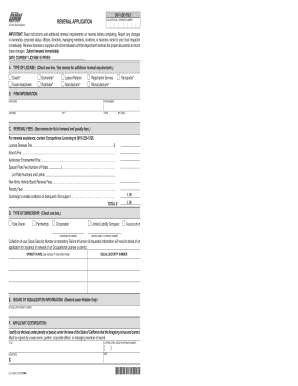
STATE OF CALIFORNIA DEPARTMENT OF MOTOR VEHICLES A Public Service Agency RENEWAL APPLICATION IMPORTANT: Read instructions and additional renewal requirements on reverse before completing. Report any.
Open form follow the instructions
Easily sign the form with your finger
Send filled & signed form or save
How to fill out the OL 45 Renewal Form online
The OL 45 Renewal Form is an essential document for renewing occupational licenses in California. This guide will provide you with a clear, step-by-step approach to completing the form online, catering to users with varying levels of legal experience.
Follow the steps to complete your OL 45 Renewal Form online.
- Click ‘Get Form’ button to obtain the form and open it in the editor.
- Begin by selecting the type of license you are renewing by checking the appropriate box in section A. Options include Dealer, Dealer Autobroker, Dismantler, Distributor, Lessor-Retailer, Manufacturer, Registration Service, Remanufacturer, or Transporter.
- In section B, fill in your firm information accurately. Provide your firm name, firm number, address, city, state, and ZIP code.
- Proceed to section C and list the renewal fees as outlined. This may include the license renewal fee, branch fee, autobroker endorsement fee, special plate fees, and any penalty fees if applicable. Ensure you total the fees at the bottom.
- In section D, identify the type of ownership by checking the corresponding box which includes Sole Owner, Partnership, Corporation, Limited Liability Company, or Association. If applicable, provide the corporation number or limited liability company number.
- In section E, if you are a dealer or lessor-retailer, include your Board of Equalization seller’s permit number.
- Complete section F by certifying the information provided. It must be signed by a sole owner, partner, corporate officer, or managing member. Include your title, area code, telephone number, and date.
- Review the entire form for accuracy and completeness. Once satisfied, you can save changes, download, print, or share the form as required.
Take action today and complete your OL 45 Renewal Form online to ensure your occupational license remains valid.
Experience a faster way to fill out and sign forms on the web. Access the most extensive library of templates available.
Related content
OL 45 (REV. 6/2020) WWW. RENEWAL APPLICATION. IMPORTANT: Read instructions and additional...
Dec 20, 2019 — application with Albuquerque Public Schools (APS). ... to the secretary...
A green card, known officially as a permanent resident card, is an identity document which...
Get answers to your most pressing questions about US Legal Forms API.
Where to mail California driver's license renewal?
You should mail your California driver's license renewal to the address indicated on the OL 45 Renewal Form you received. It is crucial to follow the guidelines to ensure all pertinent information is included. Confirm that you use the most recent address by checking the DMV’s official website before mailing.
What is the PO Box address for the California DMV?
The California DMV utilizes specific PO Box addresses for different purposes. For your OL 45 Renewal Form, refer to the DMV website for the current PO Box address relevant to your application. Using the correct address prevents delays and keeps your submission on track.
How do I mail to the DMV in California?
Mailing to the DMV in California involves addressing your envelope correctly with the required postage. For your OL 45 Renewal Form, follow the instructions provided on the form to ensure that all documents are included. This way, you facilitate a smooth process for renewing your driver's license.
Where to send documents to CA DMV?
To send documents to the California DMV, use the designated mailing address provided for your specific needs. If you're submitting the OL 45 Renewal Form, confirm you have your documents ready and check the requirements on the California DMV website. Ensuring correct submission helps avoid delays in processing your renewal.
Where do I mail my California driver's license renewal?
To mail your California driver's license renewal, including the Ol 45 Renewal Form, you will typically send it to the address specified on your renewal notice. If you do not have a notice, visit the DMV website for the correct mailing address. Always use a secure mailing method to protect your personal information. Verifying that you have included all necessary documents is essential.
Do you have to take a written test to renew your license in California?
Written Test. Written tests are required for most renewals in California. The written test for driver's license renewal contains just 18 questions meant to evaluate your knowledge of the laws, rules, and etiquette of driving in California. To pass, you must get at least 15 questions correct.
How do I renew my California occupational license?
Go to My Licenses and select the type of license you are applying for, renewing, or updating. Complete the online form. Once all items are completed, submit your online form using the Submit button.
What is a complete DL 44?
Also known as the DL 44 form, the application for a California drivers license or identification card is required when you apply for, renew, or replace your drivers license or ID card.
Do I have to take a written test to renew my license in California?
Written Test. Written tests are required for most renewals in California. The written test for driver's license renewal contains just 18 questions meant to evaluate your knowledge of the laws, rules, and etiquette of driving in California. To pass, you must get at least 15 questions correct.
How do I schedule my California license renewal?
You can make an appointment online or by calling the DMV at 1-800-777-0133. Fill out and submit a Driver License or Identification Card Application form (DL 44).
Use professional pre-built templates to fill in and sign documents online faster. Get access to thousands of forms.
If you believe that this page should be taken down, please follow our DMCA take down process here.
This form is available in several versions. Select the version you need from the drop-down list below.