Loading
Get Canon Repair Form
How it works
-

Open form follow the instructions
-

Easily sign the form with your finger
-

Send filled & signed form or save
How to fill out the Canon Repair Form online
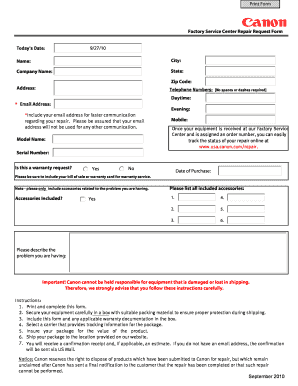
Filling out the Canon Repair Form online is a straightforward process that enables you to request repairs for your equipment efficiently. This guide provides clear step-by-step instructions to ensure that you complete the form accurately and effectively.
Follow the steps to complete the Canon Repair Form online.
- Press the ‘Get Form’ button to access the Canon Repair Form and open it in your chosen editor.
- Enter today's date in the designated field, ensuring the format is clear and up to date.
- Fill in your name and contact details, including city, state, zip code, telephone numbers (daytime and evening), and email address to facilitate faster communication regarding your repair.
- Provide details about the product by entering the model name and serial number accurately.
- Indicate whether this is a warranty request by selecting 'Yes' or 'No.' If applicable, include the date of purchase.
- List all accessories included with the equipment related to the repair issue. Ensure to number each accessory clearly.
- In the provided section, describe the problem you are experiencing with your equipment, using clear and concise language.
- Review all filled entries for accuracy before proceeding to save changes and download, print, or share the completed form.
Complete your Canon Repair Form online today and ensure your equipment receives the care it needs.
Filling ink in a printer, especially a Canon, requires care and precision. Begin by turning off and unplugging your printer for safety. Carefully remove the cartridge and follow the instructions to refill it with the appropriate ink. If your printer exhibits problems, remember to utilize the Canon Repair Form for additional help.