Loading
Get Liu18
How it works
-

Open form follow the instructions
-

Easily sign the form with your finger
-

Send filled & signed form or save
How to fill out the Liu18 online
Filling out the Liu18 form online can streamline your application process for employment opportunities with Luzerne Intermediate Unit #18. This guide provides clear, step-by-step instructions on how to complete the form effectively.
Follow the steps to successfully fill out the Liu18 form.
- Press the ‘Get Form’ button to access the Liu18 form and open it in your preferred online editor.
- Begin by entering your personal information. Fill in your last name, middle name, and first name in the designated fields. Make sure to include your social security number accurately.
- Next, provide your contact information. Fill in your street address, home telephone number (including area code), and your city, state, and zip code. If applicable, enter your business telephone number and any additional telephone number.
- Indicate if you have previously applied for employment with LIU #18 by selecting 'Yes' or 'No.' If 'Yes,' state the month and year of your previous application.
- Specify the position you are applying for and your expected pay. Additionally, indicate your availability for full-time work and willingness to work overtime if required.
- Answer questions about your ability to begin work, and whether you are interested in being placed on the substitute list if employed full time.
- If the position requires driving, indicate if you have a valid driver’s license. Also, list any special training or skills relevant to the job.
- Document your educational background by listing schools attended, course of study, years completed, and whether you graduated. Include any degrees obtained.
- Provide a comprehensive record of your full-time and part-time employment. Start with your most recent employment. Fill in company names, contact numbers, addresses, employment dates, supervisor names, job titles, and a brief description of your duties.
- List personal references who are not former employers. Include their names, occupations, addresses, and telephone numbers.
- Finally, review the application to ensure all information is accurate. Sign the form and include the date to confirm that the information provided is true and complete.
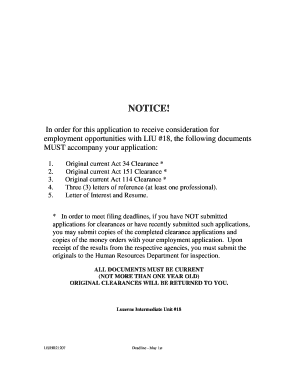
- Once complete, save your changes, and download or print the form. Ensure that you attach all required documentation before submitting to the Human Resources Department at the specified address.
Start your application process today by filling out the Liu18 form online.
Creating a FDFx file involves using software that supports the format. Start by opening your document in the appropriate program, then select the option to export or save as a FDFx file. Make sure to verify the contents to ensure everything is in order before finalizing. For additional guidance, Liu18 offers resources to simplify this process, helping you streamline your document management.