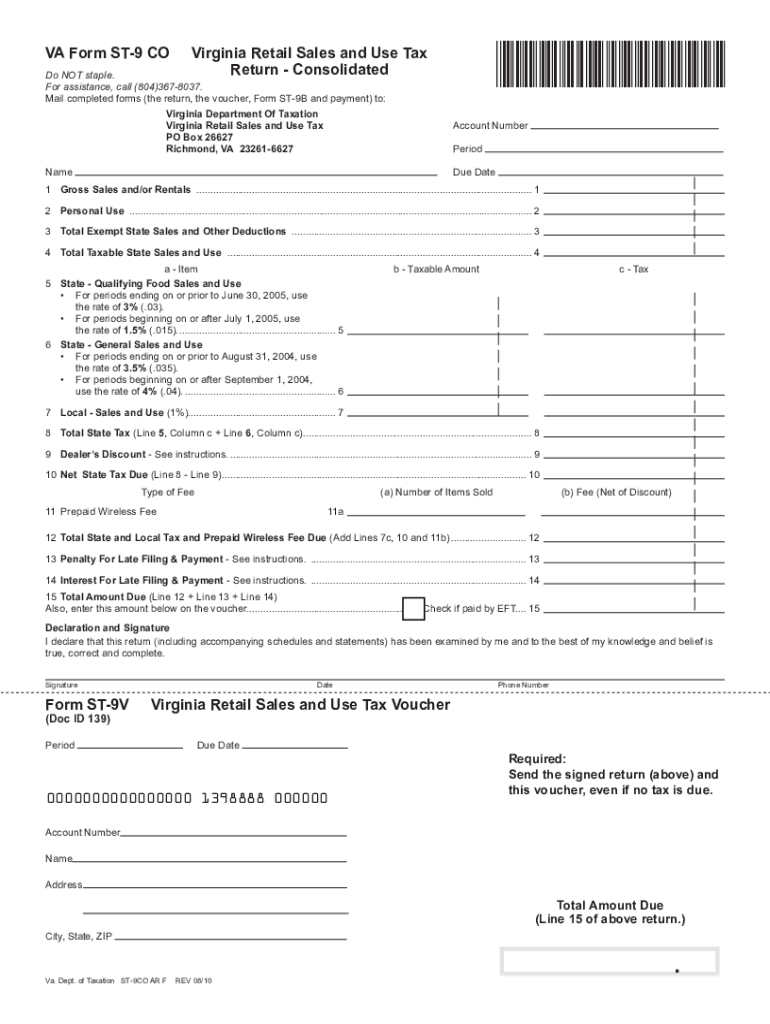
ST-9 CO Package Use for periods ending before July 1, 2013 This package contains the following: ST-9 CO Virginia Retail Sales And Use Tax Return ST-9A Virginia Retail Sales And Use Tax Worksheet ST-9B.
Loading

Open form follow the instructions

Easily sign the form with your finger

Send filled & signed form or save
How to fill out the Virginia St 9 online
Filling out the Virginia St 9 form is an essential process for individuals and businesses required to report and remit sales and use tax in Virginia. This guide provides a clear and comprehensive overview of how to complete the Virginia St 9 online, ensuring accuracy and compliance with state regulations.
Follow the steps to complete the Virginia St 9 form online.
- Press the ‘Get Form’ button to access the Virginia St 9 form and open it in the editor of your choice.
- Begin by entering your account number in the designated field at the top of the form.
- Input the reporting period for the tax return in the specified section.
- Enter your name and address as they appear on your business documents.
- Specify the due date for this tax return as indicated for the reporting period.
- Fill in your gross sales and/or rentals for the reporting period in Line 1 of the form.
- Record any personal use of tangible personal property on Line 2.
- Detail total exempt state sales and other deductions on Line 3, ensuring you accurately categorize each type of deduction.
- Calculate total taxable state sales and use on Line 4 by subtracting Line 3 from the subtotal of Lines 1 and 2.
- Input qualifying food sales and use on Line 5, followed by general sales and use on Line 6.
- Complete Line 7 for local sales and use tax.
- Add the totals from the previous lines to compute the total state tax on Line 8.
- If applicable, include any dealer's discount on Line 9, as instructed.
- Calculate your net state tax due by deducting the dealer’s discount from the total state tax on Line 10.
- Fill in details for the prepaid wireless fee on Line 11, including the number of items sold and the calculated fee.
- Total all applicable amounts including taxes and fees on Line 12.
- Add any penalties and interest for late payments on Lines 13 and 14, respectively.
- Finalize your total amount due on Line 15 and ensure it matches the summary on your voucher.
- Review the entire form for accuracy before saving your changes, downloading, or printing the completed document.
Complete the Virginia St 9 online today to ensure your taxes are filed accurately and on time.
Experience a faster way to fill out and sign forms on the web. Access the most extensive library of templates available.
Related content
ST-9. 1. Gross Sales and/or Rentals. 2. Personal Use. 3. Exempt Sales and Other...
Enter on Form ST-9, Line 1. 1. 2. Personal Use. Enter the cost price of tangible personal...
The colonists established their own small town, with a small Anglican church (known now as...
Get answers to your most pressing questions about US Legal Forms API.
How to fill out a Virginia small estate affidavit?
Filling out a Virginia small estate affidavit requires you to gather key information about the deceased's assets and debts. You will declare that the estate qualifies as a small estate under Virginia law, which typically involves assets totaling under a specific threshold. After ensuring accuracy, you can submit the affidavit to the local circuit court. To simplify this process and access templates, consider using USLegalForms for your needs.
Do I have to file a Virginia non-resident tax return?
If you earn income in Virginia but do not live there, you likely need to file a Virginia non-resident tax return. This applies to various forms of income, including wages and business earnings. Filing ensures you comply with Virginia tax laws and helps you avoid penalties. For assistance, consider exploring the resources available at USLegalForms, which can guide you through the process.
Where can I get Virginia tax forms?
Virginia tax forms are available online at the Virginia Department of Taxation’s website, where you can download or print the forms you need. Additionally, many local tax offices and public libraries stock physical copies of these forms. For a comprehensive guide, visit the Virginia St 9 platform to find the exact forms required for your specific tax situation.
How to get a Virginia resale certificate?
To acquire a Virginia resale certificate, you need to provide proof of your business and its tax registration. You can obtain the certificate online through the Virginia Department of Taxation's website. For convenient access and to ensure you're following all necessary steps, consider navigating through the resources available on Virginia St 9.
How do I get a copy of my Virginia tax return?
To obtain a copy of your Virginia tax return, you can request it through the Virginia Department of Taxation. This can typically be done online, by mail, or even by phone, depending on your preference. Utilizing resources from the Virginia St 9 platform can also guide you through the specifics of obtaining your tax return with ease.
Can I file Virginia state taxes online?
Yes, you can easily file your Virginia state taxes online using various online tax preparation services. These platforms often simplify the process and ensure you meet all filing requirements. For additional support and resources, check out the Virginia St 9 website; it can streamline your online filing experience.
How to get Virginia as a follower?
Gaining Virginia as a follower often involves engaging with local community events or joining state-focused online groups. Building connections within these communities can help you attract attention and followers from Virginia. Also, consider leveraging social media platforms connected to the Virginia St 9 network to expand your reach.
Where can I pick up Virginia state tax forms?
You can pick up Virginia state tax forms at various locations including public libraries, post offices, and local tax offices. Additionally, you can access and print these forms online through the Virginia Department of Taxation’s website. For a seamless experience, explore the Virginia St 9 platform, which can guide you to the correct forms and help simplify the filing process.
At what age do you stop paying state taxes in Virginia?
In Virginia, you typically stop paying state taxes once you reach the age of 65, provided your income falls below certain thresholds. However, circumstances may vary based on specific financial situations. It's important to consult official guidelines to understand your obligations fully. You may also find helpful resources related to Virginia tax laws on the Virginia St 9 platform.
Are state taxes filed electronically?
Yes, filing state taxes electronically in Virginia is encouraged and widely practiced. Most individuals and businesses prefer this method due to its speed and convenience. By filing electronically, you often benefit from quicker processing times for refunds. You can find helpful resources on US Legal Forms to assist with your electronic filing needs.
Use professional pre-built templates to fill in and sign documents online faster. Get access to thousands of forms.
If you believe that this page should be taken down, please follow our DMCA take down process here.