Loading
Get Ach Vendor Payment Enrollment Form - Us Department Of The Interior - Doi
How it works
-

Open form follow the instructions
-

Easily sign the form with your finger
-

Send filled & signed form or save
How to fill out the ACH Vendor Payment Enrollment Form - US Department Of The Interior - Doi online
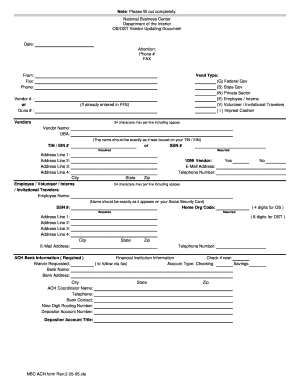
The ACH Vendor Payment Enrollment Form is an essential document for individuals and organizations wishing to receive electronic payments from the US Department of the Interior. This guide provides a clear and supportive walkthrough to help you complete the form accurately and efficiently.
Follow the steps to complete your enrollment form online.
- Click ‘Get Form’ button to obtain the form and open it in your preferred editor.
- Begin with the date field, entering the current date accurately.
- In the 'Attention' section, indicate the name of the person or department that will handle this enrollment.
- Fill in the 'Phone #' and 'FAX' fields with appropriate contact information.
- Under the 'From' section, provide your contact details including 'Fax', 'Phone', and the 'Vendor #' or 'Duns #' as applicable.
- Select your 'Vendor Type' from the options provided, ensuring that you choose the one that fits your category.
- Provide 'Vendor Name' as it appears on your TIN/EIN and include the 'DBA' (Doing Business As) name if applicable.
- Enter your 'TIN/EIN #' or 'SSN #' in the required field, ensuring it is accurate.
- Fill out the address fields, including up to four lines for your address. Ensure that each line does not exceed 24 characters.
- Indicate whether you are a '1099 Vendor' and provide your 'E-Mail Address' and 'Telephone Number'.
- If you are an employee, volunteer, or intern, complete the related fields, including the employee's name and their 'SSN #'.
- Fill in your 'Home Org Code', which is required, following the provided 4 or 6 digit guidelines.
- Complete the ACH Bank Information section, which is necessary. Provide bank details, including the bank name, address, and the nine-digit routing number.
- Ensure you check the box if this is a new account and specify the account type (checking or savings).
- After completing all sections of the form, save your changes. You can then download, print, or share the form as needed.
Complete your ACH Vendor Payment Enrollment Form online now to ensure timely processing.
Yes, an ACH Vendor Payment Enrollment Form - US Department Of The Interior - Doi acts as a direct deposit form. This form permits the government to deposit funds directly into your bank account, bypassing traditional check payments. Using this method ensures that vendors receive their payments promptly and securely.
Industry-leading security and compliance
US Legal Forms protects your data by complying with industry-specific security standards.
-
In businnes since 199725+ years providing professional legal documents.
-
Accredited businessGuarantees that a business meets BBB accreditation standards in the US and Canada.
-
Secured by BraintreeValidated Level 1 PCI DSS compliant payment gateway that accepts most major credit and debit card brands from across the globe.