Loading
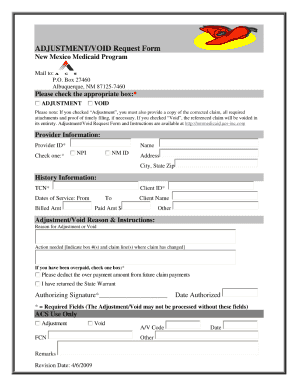
Get Adjustment Void Request Form For New Mexico Medicaid
How it works
-

Open form follow the instructions
-

Easily sign the form with your finger
-

Send filled & signed form or save
How to fill out the Adjustment Void Request Form For New Mexico Medicaid online
This guide provides clear and comprehensive instructions for completing the Adjustment Void Request Form for New Mexico Medicaid online. By following the steps outlined below, users can effectively navigate the form and ensure their requests are accurately submitted.
Follow the steps to fill out the Adjustment Void Request Form correctly.
- Click ‘Get Form’ button to obtain the form and open it in the editor.
- Begin by entering your personal information in the designated fields. This may include your name, Medicaid identification number, and contact details. Ensure that all entries are accurate to avoid delays.
- Next, specify the reason for the adjustment. This section typically requires you to provide details on why the void request is necessary. Be clear and concise in your explanation.
- Review any additional sections that may ask for information related to the services or claims affected by this adjustment. Provide all requested documentation and details as accurately as possible.
- Once all fields are completed, review the form for any errors. Ensuring that each section is filled out correctly is crucial to the success of your request.
- Finally, you can save changes, download, print, or share the form as needed, making sure to keep a copy for your records.
Complete your Adjustment Void Request Form online and submit it today for prompt processing.
To appeal a Medicaid decision in New Mexico, start by contacting your local Medicaid office or calling the customer service number. They will provide information on the appeals process and the necessary forms, which may include an Adjustment Void Request Form for New Mexico Medicaid if your appeal revolves around a claim adjustment.