Get Cigna Cobra Notification Request Form
How it works
-

Open form follow the instructions
-

Easily sign the form with your finger
-

Send filled & signed form or save
How to fill out the Cigna Cobra Notification Request Form online
Completing the Cigna Cobra Notification Request Form online is essential for individuals seeking continuation of health coverage under the Consolidated Omnibus Budget Reconciliation Act (COBRA). This guide will provide you with clear, step-by-step instructions to ensure that you fill out the form accurately and efficiently.
Follow the steps to successfully complete the form online.
- Click the ‘Get Form’ button to obtain the document and open it for editing.
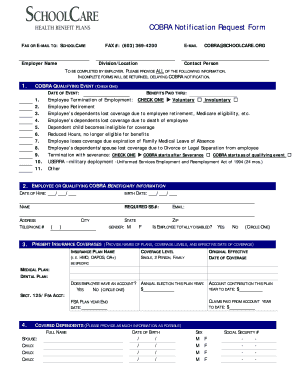
- Begin with the section labeled 'Employer Name.' Clearly enter the name of the employer associated with the COBRA notification. This information is crucial for processing your request.
- In the next field, provide the employer's fax number and e-mail address. Ensure the fax number is accurate: (603) 369-4200, and use COBRA@SCHOOLCARE.ORG for the e-mail. This allows for proper communication of your request.
- Indicate the division or location of the employer. This should be specified to aid in directing your notification to the relevant department.
- For the 'COBRA Qualifying Event' section, check one box that accurately describes the event leading to the COBRA notification request. Include the date of the event and benefits paid through date.
- Next, fill in details regarding the employee or qualifying COBRA beneficiary. Enter the date of hire, birth date, name, and Social Security number. Additionally, input the contact address and telephone number.
- Indicate the employee's gender and if they are totally disabled by circling yes or no. This information assists in determining eligibility for certain benefits.
- Provide information about present insurance coverages. Specify the insurance plan names, coverage levels, and the original effective date of coverage. This includes medical and dental plans.
- If applicable, indicate whether the employee has a Flexible Spending Account (FSA) and list any claims paid from the account to date. Be sure to include the current balance and the FSA plan year end date.
- Fill out the section for covered dependents by providing the full names, birth dates, gender, and Social Security numbers for each dependent. This information ensures that all eligible persons are accounted for in the COBRA notification.
- Finally, review all entries for accuracy. Once satisfied with the information provided, save your changes. You can download, print, or share the completed form as needed.
Complete your Cigna COBRA Notification Request Form online to ensure timely processing of your benefits.
Once your Cigna Cobra Notification Request Form is processed, you can generally expect to activate your Cobra coverage within 60 days. This period allows for the setup of your account and any necessary paperwork. By filling out your request form promptly, you help ensure a smoother transition to your Cobra benefits. Stay informed about your coverage options so you can make the best choices for your health care needs.