Loading
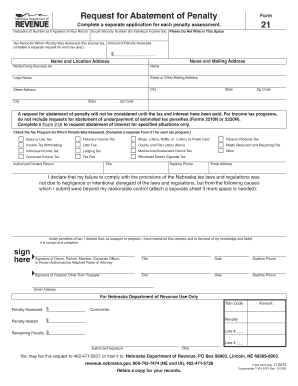
Get Kansas Department Of Revenue Abatement Forms
How it works
-

Open form follow the instructions
-

Easily sign the form with your finger
-

Send filled & signed form or save
How to fill out the Kansas Department Of Revenue Abatement Forms online
This guide provides comprehensive instructions for completing the Kansas Department Of Revenue Abatement Forms online. By following these steps, users can efficiently fill out the necessary information for a successful submission.
Follow the steps to complete the Kansas Department Of Revenue Abatement Forms online
- Click ‘Get Form’ button to obtain the form and open it for completion.
- The first section requires you to enter your Nebraska ID Number as it appears on your return and your Social Security Number if applying as an individual. Ensure you do not write in the designated space for the Department's use.
- Fill in the tax period for which the penalty was assessed. Remember to complete a separate application for each penalty assessment.
- Indicate the amount of the penalty assessed in the appropriate field next to the dollar sign.
- Next, provide your name and mailing address, as well as your business name if applicable. Include your street address, city, state, and zip code.
- Select the tax program for which the penalty was assessed. Check one box for each applicable program listed.
- Identify an authorized contact person by entering their title, daytime phone number, and email address.
- Explain the reasons for your penalty non-compliance in the provided section, ensuring that it addresses causes beyond your reasonable control. If more space is needed, attach a separate sheet.
- Sign and date the form in the designated signature area. If a preparer is submitting the request, ensure they sign and provide their information as well.
- Once all necessary fields are completed, review the form for accuracy. After confirming everything is correct, you can save changes, download, print, or share the form as needed.
Complete your abatement forms online today to ensure a smooth submission process.
The tax amendment form for Kansas is used to correct any errors on a previously filed tax return. This form allows you to amend your income, deductions, and credits, ensuring your tax records are accurate. Please refer to the Kansas Department of Revenue Abatement Forms for specific instructions on how to properly submit your amendment.
Industry-leading security and compliance
US Legal Forms protects your data by complying with industry-specific security standards.
-
In businnes since 199725+ years providing professional legal documents.
-
Accredited businessGuarantees that a business meets BBB accreditation standards in the US and Canada.
-
Secured by BraintreeValidated Level 1 PCI DSS compliant payment gateway that accepts most major credit and debit card brands from across the globe.