Loading
Get Dhs 390
How it works
-

Open form follow the instructions
-

Easily sign the form with your finger
-

Send filled & signed form or save
How to fill out the Dhs 390 online
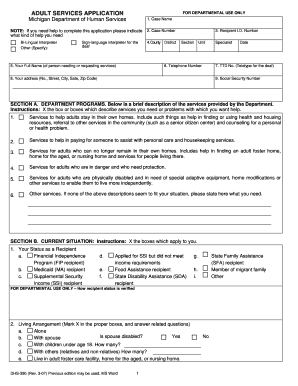
The Dhs 390 form is essential for individuals seeking assistance from the Michigan Department of Human Services. This guide provides a clear and supportive approach to help you fill out the form accurately, ensuring you receive the services you need.
Follow the steps to successfully complete the Dhs 390 online.
- Press the ‘Get Form’ button to access the Dhs 390 online and open it in the editor.
- Fill in your case name in the designated field, ensuring the information aligns with the relevant documents.
- Next, enter your case number. This is crucial for identifying your application and must be accurate.
- Provide the recipient I.D. number in the specified section, if applicable, to facilitate service processing.
- Input your full name, which is the name of the person needing or requesting services. Make sure to use their legal name.
- Include your county district and a telephone number where you can be reached for follow-up or additional information.
- If applicable, provide your TTD number, which is necessary for communication if you are deaf or hard of hearing.
- Fill in your full address, including street, city, state, and zip code, to ensure the department can reach you.
- Enter your Social Security number in the appropriate field, as it may be required for verification purposes.
- In Section A, mark the services you need by checking all relevant boxes, including support for home living or financial assistance.
- In Section B, check the boxes that describe your current status as a recipient or your living arrangements.
- Review Section C, understanding your rights and responsibilities before signing.
- Sign and date the application to certify that the information provided is accurate and complete.
- Finally, save your changes, and proceed to download, print, or share the form as needed.
Complete your Dhs 390 form online today to ensure timely access to the services you require.
To report changes to DHS Michigan, you can submit a DHS 431 form, either online or in person at your local DHS office. Ensure that you provide accurate and detailed information to avoid delays in processing. Staying updated with changes ensures you receive appropriate support, especially with services linked to Dhs 390.