Get Missouri Caregiver Background Screening
How it works
-

Open form follow the instructions
-

Easily sign the form with your finger
-

Send filled & signed form or save
How to fill out the Missouri Caregiver Background Screening online
Completing the Missouri Caregiver Background Screening form online is essential for ensuring the safety and suitability of individuals providing care services. This guide will provide clear and structured instructions on how to accurately fill out the form, making the process straightforward for users with varying levels of experience.
Follow the steps to complete the screening form with ease.
- Press the ‘Get Form’ button to obtain the Missouri Caregiver Background Screening form and open it in your chosen editor.
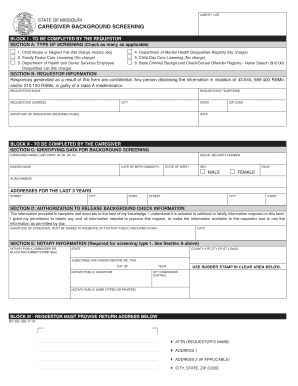
- In Block I, Section A: Type of Screening, review the options provided and check all applicable boxes for the types of screenings you require. Make sure to indicate if the screenings require a notary public.
- Complete Section B by providing your name, telephone number, address, city, state, zip code, and your signature in ink, which is mandatory.
- In Block II, Section C: Identifying Data for Background Screening, the caregiver must enter identifying details such as their name, social security number, maiden name, date of birth, state of birth, sex, race, and any alias names. Be sure to list all addresses where they have lived for the past three years.
- In Section D: Authorization to Release Background Check Information, the caregiver must confirm the accuracy of the information and sign in the presence of a notary public, providing the date of signing.
- If Section D requires a notary, Section E must also be completed, which includes the notary's seal, name, and signature.
- In Block III, provide your return address information, ensuring it is complete with name, address, city, state, and zip code.
- Once the form is filled out completely, you can save the changes, download the completed form, print it, or share it as necessary.
Fill out and submit your Missouri Caregiver Background Screening form online today for a smooth screening process.
Get form
To initiate a Missouri family care background check, you will typically need to complete a request form at the designated agency. This process may involve fingerprinting and submitting necessary identification. Platforms like US Legal Forms streamline this process, ensuring that you have everything required for an efficient screening. By following the Missouri Caregiver Background Screening procedures, you can secure a thorough background check.