Loading
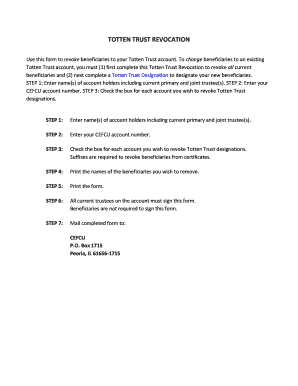
Get Totten Trust Revocation Form (pdf, 163 Kb) - Cefcu
How it works
-

Open form follow the instructions
-

Easily sign the form with your finger
-

Send filled & signed form or save
How to use or fill out the Totten Trust Revocation Form (PDF, 163 KB) - CEFCU online
The Totten Trust Revocation Form allows account holders to revoke beneficiaries associated with their Totten Trust accounts. This guide provides clear, step-by-step instructions to help you complete the form accurately and efficiently, ensuring a smooth online process.
Follow the steps to complete the Totten Trust revocation form successfully.
- Begin by obtaining the Totten Trust Revocation Form. Use the ‘Get Form’ button to access the form and open it for editing.
- Enter the full names of the account holders, which should include both the primary and any joint trustees associated with the Totten Trust account.
- Provide your CEFCU account number in the designated field on the form.
- Review the accounts listed and check the box next to each account for which you wish to revoke the Totten Trust designations. Ensure you include any suffixes where required, particularly for certificates.
- Clearly write the names of the beneficiaries you wish to remove from the trust in the space provided on the form.
- Print the completed form for signature. All current trustees on the account are required to sign the form; beneficiaries are not required to sign.
- Once all signatures are obtained, mail the completed form to CEFCU at the designated address: CEFCU, P.O. Box 1715, Peoria, IL 61656-1715.
Now that you have the guidance, complete your Totten Trust Revocation Form online.