Loading
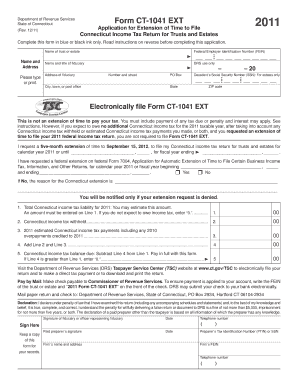
Get 2012 Irs Form 1041 Ext Fillable
How it works
-

Open form follow the instructions
-

Easily sign the form with your finger
-

Send filled & signed form or save
How to fill out the 2012 IRS Form 1041 Ext Fillable online
Filling out the 2012 IRS Form 1041 Ext Fillable can seem daunting, but with clear instructions, you can navigate the process with confidence. This guide will provide step-by-step guidance to ensure that you complete the form accurately and successfully.
Follow the steps to complete your form effectively.
- Click ‘Get Form’ button to obtain the form and open it in the editor.
- Begin by entering the name of the trust or estate in the designated field.
- Input the Federal Employer Identification Number (FEIN), ensuring you have this number prior to filing.
- Fill in the name and title of the fiduciary in the provided sections, followed by their address including street number, city, state, and ZIP code.
- If applicable, enter the decedent’s Social Security Number (SSN) in the specified area for estates.
- Indicate the request for an extension by selecting the five-month extension option, ensuring you clearly note the cycle date if it is for a fiscal year.
- Complete the sections regarding Connecticut income tax liability, ensuring to estimate the total tax due, tax withheld, and any estimated payments made.
- Perform calculations as instructed, entering your total liabilities and payments into the respective fields on the form.
- Sign the form where indicated, and include the date and telephone number.
- After confirming all information is accurate, save changes, download the completed form, or opt to print or share it as required.
Complete your documentation today to ensure timely filing and compliance.
Yes, you can fill out the 2012 IRS Form 1041 Ext Fillable online. Various software programs and platforms, like UsLegalForms, provide interactive tools for completing the form digitally. This option is convenient and can simplify the process significantly. Online filing also allows for easier saving and sharing of your completed documents.