Loading
Get Mv38d
How it works
-

Open form follow the instructions
-

Easily sign the form with your finger
-

Send filled & signed form or save
How to fill out the MV-38D online
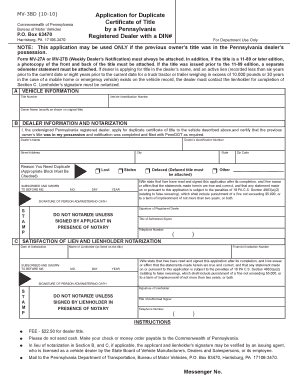
The MV-38D is an application form for obtaining a duplicate certificate of title for a vehicle by a Pennsylvania registered dealer. This guide will provide you with step-by-step instructions to complete the form online, ensuring all necessary fields are filled out accurately.
Follow the steps to complete the MV-38D application form online.
- Click ‘Get Form’ button to obtain the MV-38D form and open it in the editor.
- In section A, fill in the vehicle information. This includes the Vehicle Identification Number (VIN), Title Number, and the Owner Name as it appears on the original title.
- Proceed to section B for dealer information. Enter your dealer's name, dealer identification number, street address, city, state, and zip code.
- Indicate the reason you need a duplicate title by checking the appropriate box (Lost, Stolen, Defaced, or Other) and provide a date if necessary.
- Sign and date the application, certifying that the previous owner’s title was in your possession. Ensure that section B is notarized.
- If applicable, complete section C by providing the name of the lienholder and satisfying the lien. This section must also be notarized.
- Review the completed form to ensure all information is accurate. Save your changes, download a copy for your records, and prepare to submit.
- Submit the completed form along with any necessary attachments and payment to the Pennsylvania Department of Transportation.
Complete your MV-38D application online today to expedite your duplicate title request.
Yes, you can obtain a copy of your Pennsylvania vehicle registration online. You need to visit the official PennDOT website, where you may find options for accessing your records. This convenience saves time and streamlines the process, allowing you to manage your vehicle information quickly and easily.