Loading
Get Indymac Release Department
How it works
-

Open form follow the instructions
-

Easily sign the form with your finger
-

Send filled & signed form or save
How to fill out the Indymac Release Department online
This guide provides a comprehensive walkthrough for filling out the Indymac Release Department form online. It aims to assist users in understanding each component of the form and ensuring accurate completion.
Follow the steps to successfully complete the Indymac Release Department form.
- Click the ‘Get Form’ button to access the release department form. This will allow you to open the document in your preferred online editor.
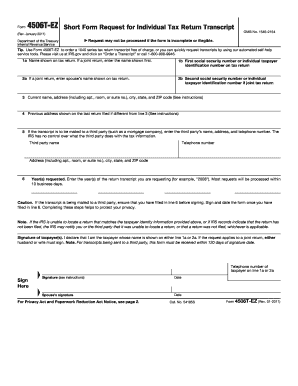
- Begin filling out the form by entering your name as it appears on the tax return in the designated field. If you are submitting a joint return, include the first name listed on the document.
- Enter the first social security number or individual taxpayer identification number from the tax return in the following field.
- If applicable, input your spouse’s name and their social security number, ensuring that both names and numbers are correctly associated with the joint return.
- Provide your current address, including apartment or suite number, ensuring that it aligns with your most recent return filed.
- If your previous address differs from the one provided, please fill it out as shown on your last return filed.
- To send your transcript to a third party, enter their name, address, and phone number in the specified fields cautiously, as the IRS cannot control the handling of this information.
- Indicate the specific tax year(s) for which you are requesting the transcript to ensure accurate processing.
- Upon completing filling out all information, sign and date the form. Ensure that all entries are accurate, especially if the transcript is being sent to a third party; any discrepancies can result in rejection.
- Finally, review the entire form for completeness. Once satisfied, save changes, and choose to download, print, or share the completed form as needed.
Take action today by completing your Indymac Release Department form online for a quick and efficient process.
IndyMac Mortgage Services is now a part of the larger financial framework established by OneWest Bank. This unit continues to provide mortgage services and support for former IndyMac customers. If you need information related to your mortgage, the IndyMac Release Department can assist you in navigating available options and resources.