Loading
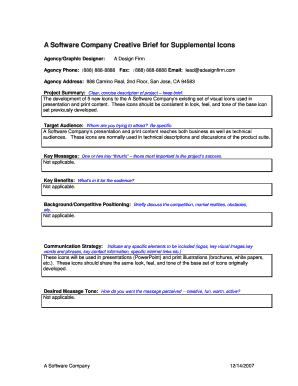
Get Creative Brief: New Icon Creation - Applied Product Marketing
How it works
-

Open form follow the instructions
-

Easily sign the form with your finger
-

Send filled & signed form or save
How to fill out the Creative Brief: New Icon Creation - Applied Product Marketing online
This guide will provide you with a clear and comprehensive approach to filling out the Creative Brief for the New Icon Creation project. By following the outlined steps, you will ensure that all necessary information is accurately captured and effectively communicated.
Follow the steps to successfully complete the Creative Brief.
- Press the 'Get Form' button to acquire the Creative Brief form and launch it in the appropriate online editor.
- Fill in the 'Agency/Graphic Designer' section with the relevant agency details, including agency name, phone number, fax number, email, and address.
- In the 'Project Summary' field, provide a succinct description of the project, highlighting that it involves the creation of five new icons to complement the existing set.
- Specify the 'Target Audience' by detailing the groups you aim to reach, which include both business and technical users of A Software Company's presentations and print materials.
- For the 'Key Messages' and 'Key Benefits', indicate that these sections are not applicable, as specified in the form.
- Under 'Background/Competitive Positioning', note that this section is also not applicable. This allows you to maintain focus on the specific project components.
- In the 'Communication Strategy' section, outline the intended use of the icons, specifying their application in presentations and print formats.
- Complete the 'Desired Message Tone' field by indicating that this section is not applicable as well.
- Document the 'Project Timeline' by outlining the significant milestones, including briefing, creative development, revisions, and final layouts.
- Enter the anticipated budget range in the 'Anticipated Budget' section, ensuring to specify the amount as stated in the signed proposal.
- For the 'Other' section, provide additional details about each of the new icons, including their definitions, background, and uses.
- Once all sections are filled, save your changes, and use available options to download, print, or share the completed form.
Take the next step and complete your Creative Brief online for effective project management.
To write a design brief for a product, start by clearly defining the goals and objectives of the project. Include target audience insights and any specific requirements or constraints. It’s also vital to describe the desired tone and style, as well as any team members involved in the Creative Brief: New Icon Creation - Applied Product Marketing process.
Industry-leading security and compliance
US Legal Forms protects your data by complying with industry-specific security standards.
-
In businnes since 199725+ years providing professional legal documents.
-
Accredited businessGuarantees that a business meets BBB accreditation standards in the US and Canada.
-
Secured by BraintreeValidated Level 1 PCI DSS compliant payment gateway that accepts most major credit and debit card brands from across the globe.