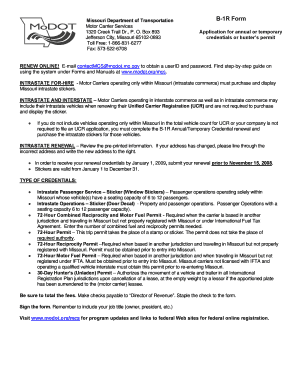
Get Mo Dot B 1r 2019 Fillable
How it works
-

Open form follow the instructions
-

Easily sign the form with your finger
-

Send filled & signed form or save
How to fill out the Mo Dot B 1r 2019 Fillable online
Filling out the Mo Dot B 1r 2019 Fillable form is a straightforward process that can be completed online. This guide provides detailed, step-by-step instructions to assist users in accurately completing the form while ensuring a smooth submission experience.
Follow the steps to successfully fill out your form.
- Click 'Get Form' button to obtain the form and open it in the editor.
- Review the pre-printed information on the form. If you notice any inaccuracies in your address, line through the incorrect information and clearly write your new address next to it.
- Indicate the type of credentials you are applying for. Choose from options such as Intrastate Passenger Service, 72-Hour Combined Reciprocity Permit, or the 30-Day Hunter’s Permit, depending on your needs.
- If you are applying for permits, specify the number of each permit required, as outlined in the various credential options provided.
- Calculate the total fees due for your application. Ensure that you have included all necessary amounts based on the permits requested.
- Make your check payable to 'Director of Revenue' and staple it to the completed form.
- Sign the form and be sure to include your job title (e.g., owner, president) to validate your submission.
- Once all fields are completed, save your changes and then proceed to download, print, or share the form as needed.
Complete your Mo Dot B 1r 2019 Fillable form online today!
To get a MO dot number, you need to fill out the Mo Dot B 1r 2019 Fillable form accurately. This process can be done online, ensuring that you have all necessary information readily available, which simplifies the submission. Additionally, using platforms like uslegalforms can guide you through requirements and provide support, making sure you meet all criteria for approval. Don’t hesitate to check for updates on your application status once submitted.