Loading
Get Dch 1169 E
How it works
-

Open form follow the instructions
-

Easily sign the form with your finger
-

Send filled & signed form or save
How to fill out the Dch 1169 E online
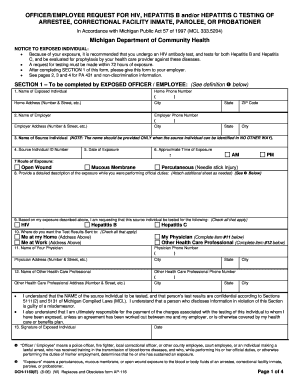
Filling out the Dch 1169 E form online is essential for individuals requesting testing following potential exposure to bloodborne pathogens. This guide provides clear, step-by-step instructions to assist users in completing the form accurately and efficiently.
Follow the steps to properly fill out the Dch 1169 E online.
- Click ‘Get Form’ button to access the Dch 1169 E form. This will allow you to open and edit the form in the designated online editor.
- Section 1 is to be completed by the exposed officer or employee. Begin by entering your full name, home phone number, and home address. Include your city, state, and ZIP code.
- Next, provide the name of your employer, the employer’s phone number, and their address. Similarly, include the city and state of the employer.
- If applicable, enter the name and ID number of the source individual, ensuring this is done only when identification is necessary.
- Record the date and approximate time of exposure, as well as the route of exposure (select one from the provided options).
- In the description area, provide a detailed account of the exposure incident. If needed, attach an additional sheet.
- Indicate the tests you are requesting for the source individual by checking the relevant boxes for HIV, Hepatitis B, and Hepatitis C.
- Choose where you want the test results sent by checking the relevant options. Fill in the details for your physician or any other health care professional if designated.
- Sign the form to confirm your request and enter the date of submission.
- Once you have completed all sections, review the information for accuracy. Save the changes, download a copy, or print the form as needed. Ensure to share it as required.
Complete your documents online today to ensure prompt action and follow-up!