Loading
Form preview
  • US Legal Forms
  • Form Library
  • Industry Forms
  • Industry Legal Forms
  • Income Withholding For Support

Get Income Withholding For Support

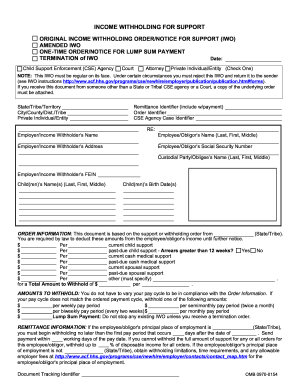
Nt and if necessary this FIPS code: Remit payment to at . (SDU/Tribal Order Payee) (SDU/Tribal Payee Address) Return to Sender Completed by Employer/Income Withholder . Payment must be directed to an SDU in accordance with 42 USC 666(b)(5) and (b)(6) or Tribal Payee (see Payments to SDU below). If payment is not directed to an SDU/ Tribal Payee or this IWO is not regular on its face, you must check this box and return the IWO to the sender. Signature of Judge/Issuing Official (if required b.

How it works

  1. Open form

    Open form follow the instructions

  2. Easily sign form

    Easily sign the form with your finger

  3. Share form

    Send filled & signed form or save

How to fill out the Income Withholding for Support online

The Income Withholding for Support form is essential for ensuring timely child and spousal support payments. This user-friendly guide provides clear step-by-step instructions to help you fill out the form accurately online, ensuring compliance with support orders.

Follow the steps to complete the Income Withholding for Support form online

  1. Click the ‘Get Form’ button to access the Income Withholding for Support form and open it in your editing tool.
  2. Enter the date at the top of the form. This should reflect the date you are filling out the form.
  3. Provide the remittance identifier and order identifier as directed, ensuring these are accurate for proper tracking.
  4. Fill out the child or children’s names and their birth dates. Make sure this information is correct to prevent delays.
  5. Indicate the total amount to withhold based on the specified payment cycle (weekly, biweekly, semimonthly, or monthly) under amounts to withhold.
  6. Complete the additional employer/income withholder information regarding the Federal Employer Identification Number (FEIN), and any necessary details about multiple IWOs.

Start your process for completing the Income Withholding for Support form online today.

Get form

Experience a faster way to fill out and sign forms on the web. Access the most extensive library of templates available.
Get form

Related content

Income Withholding for Support (IWO) Form...
Oct 5, 2023 — The IWO is the OMB-approved form (PDF) used for income withholding in...
Learn more
45 CFR § 303.100 - Procedures for income...
(1) To initiate withholding, the State must send the noncustodial parent's employer a...
Learn more
2017 General Instructions for Forms W-2 and W-3
May 2, 2017 — Because federal income tax withholding is only required when a payment is...
Learn more

Related links form

AK PG-625 2006 AK PG-630 2006 AK PG-640 2006 AK PG-650 2016

Questions & Answers

Get answers to your most pressing questions about US Legal Forms API.

Contact support

To deduct child support from payroll in QuickBooks, you first need to create a new payroll item for the child support deduction. Enter the details from the income withholding order, including the amount to be withheld. Then, assign this payroll item to the employee’s profile and verify that the deductions are correctly reflected in the employee’s paycheck. For further help, resources like uslegalforms can provide templates and guidance for setting up payroll deductions.

On a paycheck, child support payments typically appear as a specific line item labeled 'Child Support' or 'Income Withholding.' This notation helps employees easily identify the deduction being made from their earnings. It is essential to ensure that the deduction amount is clear and corresponds with the income withholding order. Using a comprehensive payroll system can streamline this process and provide transparency for both employees and employers.

To deduct child support from payroll, employers must receive an income withholding order that specifies the amount to be withheld. Once the order is in place, the employer should implement this deduction in their payroll system. Regularly review the withholding amounts to ensure compliance with any changes, and keep the proper documentation for records. Reliable platforms like uslegalforms can provide guidance on setting up and managing these processes.

Child support is deducted from payroll before taxes are applied, which means that the withholding reduces the employee's gross income. This method ensures that the required amount for income withholding for support is collected consistently, regardless of tax deductions. It is important to note that this deduction will not affect any tax liabilities. Employers should ensure compliance with state laws regarding the proper processing of these withholdings.

Income withholding for support operates as a way to ensure that child support payments are made directly from the non-custodial parent's paycheck. When an income withholding order is issued, the employer deducts a specified amount from the employee's earnings and sends it directly to the state or the custodial parent. This process helps create a reliable payment schedule, reducing the chances of missed payments. By using this system, everyone involved can better manage their financial responsibilities.

Determining your withholding allowance requires careful consideration of your financial situation, including your income, deductions, and liabilities. Generally, a higher number of allowances leads to less withholding, while a lower number results in more tax being taken out of your paycheck. Always account for obligations such as income withholding for support, ensuring you do not under-withhold and risk complications later. Utilizing online tools or consulting a tax professional can give you clarity on the right allowance to claim.

To fill out a withholding allowance form, begin by entering your personal information, including your name, address, and Social Security number. Then, review the guidance provided, especially the employee's withholding allowance worksheet. Carefully calculate the number of allowances you qualify for based on your situation, and make sure you consider your obligations like income withholding for support. Finally, submit the completed form to your employer for processing.

The amount you decide to put for extra withholding on your W-4 should reflect your individual financial circumstances. If you foresee owing additional taxes due to income withholding for support, consider adding a specific dollar amount that you'll feel comfortable with to cover those extra expenses. It's advisable to consult with a tax advisor or use the IRS tax withholding calculator to ensure you're making an informed decision. Adjusting your extra withholding can help you manage your finances throughout the year.

Choosing between 0 or 1 allowances depends on your financial strategy. Claiming 0 allows for higher tax withholding, which may lead to a refund during tax season. On the other hand, claiming 1 decreases withholding, potentially providing you with more income throughout the year but could leave you owing taxes if under-withheld. Carefully assess your situation to determine the best approach for your obligations, including income withholding for support.

In California, an income withholding order for support is a legal directive for employers to withhold a portion of an employee's earnings to cover child support obligations. This order ensures that child support payments are made consistently and on time. It provides a streamlined method to facilitate the collection of support payments directly from wages, reducing missed payments and fostering responsibility. If you need assistance with creating or understanding such orders, US Legal Forms can be a helpful resource.

Get This Form Now!

Use professional pre-built templates to fill in and sign documents online faster. Get access to thousands of forms.
Get form
If you believe that this page should be taken down, please follow our DMCA take down processhere.
Get Income Withholding for Support
Get form
  • Adoption
  • Bankruptcy
  • Contractors
  • Divorce
  • Home Sales
  • Employment
  • Identity Theft
  • Incorporation
  • Landlord Tenant
  • Living Trust
  • Name Change
  • Personal Planning
  • Small Business
  • Wills & Estates
  • Packages A-Z
  • Affidavits
  • Bankruptcy
  • Bill of Sale
  • Corporate - LLC
  • Divorce
  • Employment
  • Identity Theft
  • Internet Technology
  • Landlord Tenant
  • Living Wills
  • Name Change
  • Power of Attorney
  • Real Estate
  • Small Estates
  • Wills
  • All Forms
  • Forms A-Z
  • Form Library
  • Legal Hub
  • About Us
  • Help Portal
  • Legal Resources
  • Blog
  • Affiliates
  • Contact Us
  • Delete My Account
  • Site Map
  • Industries
  • Forms in Spanish
  • Localized Forms
  • State-specific Forms
  • Forms Kit
  • Real Estate Handbook
  • All Guides
  • Notarize
  • Incorporation services
  • For Consumers
  • For Small Business
  • For Attorneys
  • USLegal
  • FormsPass
  • pdfFiller
  • signNow
  • altaFlow
  • DocHub
  • Instapage
Form Packages
  • Adoption
  • Bankruptcy
  • Contractors
  • Divorce
  • Home Sales
  • Employment
  • Identity Theft
  • Incorporation
  • Landlord Tenant
  • Living Trust
  • Name Change
  • Personal Planning
  • Small Business
  • Wills & Estates
  • Packages A-Z
Form Categories
  • Affidavits
  • Bankruptcy
  • Bill of Sale
  • Corporate - LLC
  • Divorce
  • Employment
  • Identity Theft
  • Internet Technology
  • Landlord Tenant
  • Living Wills
  • Name Change
  • Power of Attorney
  • Real Estate
  • Small Estates
  • Wills
  • All Forms
  • Forms A-Z
  • Form Library
Customer Service
  • Legal Hub
  • About Us
  • Help Portal
  • Legal Resources
  • Blog
  • Affiliates
  • Contact Us
  • Delete My Account
  • Site Map
  • Industries
  • Forms in Spanish
  • Localized Forms
  • State-specific Forms
  • Forms Kit
Legal Guides
  • Real Estate Handbook
  • All Guides
Prepared for you
  • Notarize
  • Incorporation services
Our Customers
  • For Consumers
  • For Small Business
  • For Attorneys
Our Sites
  • USLegal
  • FormsPass
  • pdfFiller
  • signNow
  • altaFlow
  • DocHub
  • Instapage
Social Media
Call us now toll free:
+1 833 426 79 33
As seen in:
© Copyright 1999-2026 airSlate Legal Forms, Inc. 17 Station Street, Suite 303, Brookline, MA 02445
  • Your Privacy Choices
  • Terms of Service
  • Privacy Notice
  • Content Takedown Policy
  • Bug Bounty Program