We use cookies to improve security, personalize the user experience, enhance our marketing activities (including cooperating with our marketing partners) and for other business use.
Click "here" to read our Cookie Policy. By clicking "Accept" you agree to the use of cookies. Read less
Read more
Accept
Loading
Form preview
  • US Legal Forms
  • Form Library
  • More Forms
  • More Uncategorized Forms
  • Imanage Personal Banking Form

Get Imanage Personal Banking Form

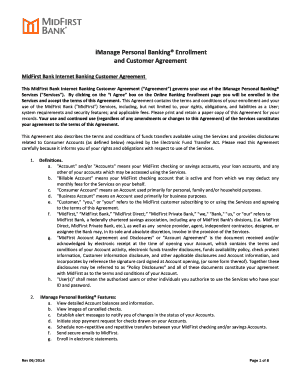
IManage Personal Banking Enrollment and Internet Banking Customer Agreement MidFirst Bank Internet Banking Customer Agreement This MidFirst Bank Internet Banking Customer Agreement Agreement governs your use of the iManage Personal Banking Services Services. E. Agreement means collectively this iManage Personal Banking Enrollment and Internet Banking Customer modification updates or changes hereto. EZCard system means the single sign-on system .

How it works

  1. Open form

    Open form follow the instructions

  2. Easily sign form

    Easily sign the form with your finger

  3. Share form

    Send filled & signed form or save

How to fill out the Imanage Personal Banking Form online

Filling out the Imanage Personal Banking form online is a crucial step in accessing your banking services with MidFirst Bank. This guide provides you with a clear pathway to complete the form accurately and efficiently.

Follow the steps to correctly complete the Imanage Personal Banking form online.

  1. Click the ‘Get Form’ button to obtain the Imanage Personal Banking form and open it in your preferred online editor.
  2. Provide your personal information including your full name, address, and contact details in the designated fields. Make sure to input valid information to avoid issues with your enrollment.
  3. Enter your account details, including the type of account you wish to enroll in. Ensure you select whether it's a checking or savings account, as this affects the services available to you.
  4. Choose a secure user ID and password. These credentials will be essential for accessing your account, so it is essential to create a strong password that you can remember.
  5. Review the section regarding terms and conditions. It is vital to read through the agreement thoroughly to understand your rights and obligations as a user.
  6. Submit the form by clicking the ‘Submit’ button after ensuring all information is accurate. You may need to verify your email or provide additional documentation as instructed.
  7. Once submitted, you can save any changes, download a copy for your records, or print the form as needed.

Start completing your Imanage Personal Banking form online now to enjoy efficient banking services!

Get form

Experience a faster way to fill out and sign forms on the web. Access the most extensive library of templates available.
Get form

Related content

iManage, Inc. - SEC.gov
iManage has filed this amended Quarterly Report on Form 10-Q/A to revise its disclosure...
Learn more
Account Agreement Disclosure - UCO
Reserve Banks and of any clearing house association of ... We may ask for a form of...
Learn more
Japanese yen - Wikipedia
The yen is the official currency of Japan. It is the third most traded currency in the...
Learn more

Related links form

MO Sign Permit Application - City Of Foristell 2009 MX Casa Jose Rental Agreement_DSA NY Marlboro Central School District Landlord Statement 2018 CA United Way Landlord Form - Monterey County 2021

Questions & Answers

Get answers to your most pressing questions about US Legal Forms API.

Contact support

Resetting your online banking password is simple. Navigate to the login page of your bank, select 'Forgot Password,' and follow the instructions provided. Always consider using the Imanage Personal Banking Form to ensure you have a clear record of your passwords and banking changes for future reference.

To reset your MidFirst Bank password, go to the login page and click 'Forgot Password.' Follow the prompts to receive a reset link in your email. Take advantage of the Imanage Personal Banking Form to keep track of your banking credentials and any changes you make.

To change your MidFirst Bank password, log into your online banking account and access the security settings. There, you will find an option to update your password. As you navigate through this process, think about using the Imanage Personal Banking Form for any documentation needs, ensuring that all changes are well recorded.

If you cannot log into online banking, first ensure you are entering the correct username and password. If the issue persists, use the password reset feature or contact customer support for further assistance. Utilizing the Imanage Personal Banking Form can help you present all necessary information in one place, making the resolution process smoother.

To reset your Bankfirst password, visit the Bankfirst website and click on the 'Forgot Password' link. You will receive instructions via email to create a new password. If you need assistance, consider using the Imanage Personal Banking Form to streamline any communications. Remember, maintaining a strong password helps protect your financial information.

Filling out a bank application form like the Imanage Personal Banking Form requires you to input accurate personal details along with your financial history. Follow the guidelines provided on the form carefully, ensuring all sections are complete. It’s crucial to double-check your entries to avoid delays in processing.

A bank application form is a document required to open a banking account or request services from a bank. This form, including the Imanage Personal Banking Form, typically asks for personal information, financial history, and specific requests. Properly completed forms help streamline the approval process for banking services.

To fill out a bank reference form, you first need to provide the names and contact information of references, such as employers or other financial institutions. Clearly indicate your relationship with these references, and ensure that they are aware you are using them as contacts. The Imanage Personal Banking Form could also require you to elaborate on previous banking experiences.

Filling out a bank account application form, like the Imanage Personal Banking Form, involves providing personal information such as your name, address, and Social Security number. Be sure to clarify the type of account desired and comply with identification requirements. Accurate information will help facilitate the account opening process.

When writing an application to the bank, begin with a clear introduction stating your purpose. Include relevant details such as your account information and the specific request you have, whether it is regarding the Imanage Personal Banking Form or other services. Conclude with a polite closing and your contact information for follow-up.

Get This Form Now!

Use professional pre-built templates to fill in and sign documents online faster. Get access to thousands of forms.
Get form
If you believe that this page should be taken down, please follow our DMCA take down processhere.

Industry-leading security and compliance

US Legal Forms protects your data by complying with industry-specific security standards.
  • In businnes since 1997
    25+ years providing professional legal documents.
  • Accredited business
    Guarantees that a business meets BBB accreditation standards in the US and Canada.
  • Secured by Braintree
    Validated Level 1 PCI DSS compliant payment gateway that accepts most major credit and debit card brands from across the globe.
Get Imanage Personal Banking Form
Get form
Form Packages
Adoption
Bankruptcy
Contractors
Divorce
Home Sales
Employment
Identity Theft
Incorporation
Landlord Tenant
Living Trust
Name Change
Personal Planning
Small Business
Wills & Estates
Packages A-Z
Form Categories
Affidavits
Bankruptcy
Bill of Sale
Corporate - LLC
Divorce
Employment
Identity Theft
Internet Technology
Landlord Tenant
Living Wills
Name Change
Power of Attorney
Real Estate
Small Estates
Wills
All Forms
Forms A-Z
Form Library
Customer Service
Terms of Service
Privacy Notice
Legal Hub
Content Takedown Policy
Bug Bounty Program
About Us
Help Portal
Legal Resources
Blog
Affiliates
Contact Us
Delete My Account
Site Map
Industries
Forms in Spanish
Localized Forms
State-specific Forms
Forms Kit
Legal Guides
Real Estate Handbook
All Guides
Prepared for You
Notarize
Incorporation services
Our Customers
For Consumers
For Small Business
For Attorneys
Our Sites
US Legal Forms
USLegal
FormsPass
pdfFiller
signNow
airSlate WorkFlow
DocHub
Instapage
Social Media
Call us now toll free:
+1 833 426 79 33
As seen in:
  • USA Today logo picture
  • CBC News logo picture
  • LA Times logo picture
  • The Washington Post logo picture
  • AP logo picture
  • Forbes logo picture
© Copyright 1997-2025
airSlate Legal Forms, Inc.
3720 Flowood Dr, Flowood, Mississippi 39232
Form Packages
Adoption
Bankruptcy
Contractors
Divorce
Home Sales
Employment
Identity Theft
Incorporation
Landlord Tenant
Living Trust
Name Change
Personal Planning
Small Business
Wills & Estates
Packages A-Z
Form Categories
Affidavits
Bankruptcy
Bill of Sale
Corporate - LLC
Divorce
Employment
Identity Theft
Internet Technology
Landlord Tenant
Living Wills
Name Change
Power of Attorney
Real Estate
Small Estates
Wills
All Forms
Forms A-Z
Form Library
Customer Service
Terms of Service
Privacy Notice
Legal Hub
Content Takedown Policy
Bug Bounty Program
About Us
Help Portal
Legal Resources
Blog
Affiliates
Contact Us
Delete My Account
Site Map
Industries
Forms in Spanish
Localized Forms
State-specific Forms
Forms Kit
Legal Guides
Real Estate Handbook
All Guides
Prepared for You
Notarize
Incorporation services
Our Customers
For Consumers
For Small Business
For Attorneys
Our Sites
US Legal Forms
USLegal
FormsPass
pdfFiller
signNow
airSlate WorkFlow
DocHub
Instapage
Social Media
Call us now toll free:
+1 833 426 79 33
As seen in:
  • USA Today logo picture
  • CBC News logo picture
  • LA Times logo picture
  • The Washington Post logo picture
  • AP logo picture
  • Forbes logo picture
© Copyright 1997-2025
airSlate Legal Forms, Inc.
3720 Flowood Dr, Flowood, Mississippi 39232