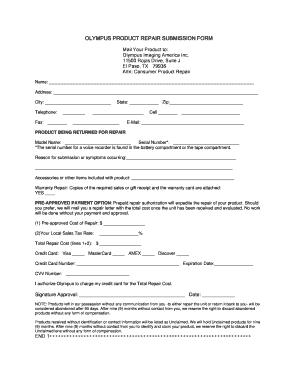
Please bring this document along with the Repair Submission form We have arranged a special Olympus Corporate Accounts Customer discount program with The UPS Store. OLYMPUS PRODUCT REPAIR SUBMISSION FORM Mail Your Product to Olympus Imaging America Inc. 11500 Rojas Drive Suite J El Paso TX 79936 Attn Consumer Product Repair Name Address City Telephone Fax State Zip Cell E-Mail PRODUCT BEING RETURNED FOR REPAIR Model Name Serial Number The serial .
Open form follow the instructions
Easily sign the form with your finger
Send filled & signed form or save
How to fill out the Olympus Online Repair Submission Form online
Filling out the Olympus Online Repair Submission Form is a straightforward process that enables users to submit their products for repair efficiently. This guide will walk you through each section of the form, ensuring that you provide all necessary information for a smooth repair experience.
Follow the steps to complete your repair submission form.
- Click ‘Get Form’ button to obtain the form and open it in the editor.
- In the first section, enter your name, address, city, state, and zip code. Ensure that all details are correct to prevent any communication issues during the repair process.
- Provide your telephone number and email address. This information will be vital for any updates regarding your repair status.
- In the 'Product Being Returned for Repair' section, fill in the model name and serial number of the product. Note that the serial number for a voice recorder can be found in the battery or tape compartment.
- Describe the reason for your submission or any symptoms the product is experiencing. Be as specific as possible to help the repair team diagnose the issue effectively.
- List any accessories or other items that you are including with the product for repair. This helps ensure that everything is accounted for during the process.
- If your repair falls under warranty, indicate this by checking 'YES' and attach the required sales or gift receipt, along with the warranty card.
- If you prefer pre-approved payment to expedite your repair, fill in the pre-approved cost of repair and your local sales tax rate.
- Provide your credit card information, including the card type, number, expiration date, and CVV number, if opting for payment via credit card. Remember to authorize Olympus to charge your card for the total repair cost.
- Sign and date the form to confirm your authorization for the charges.
- Once you have completed the form, save any changes made. You can then download, print, or share the form as needed.
Complete your Olympus Online Repair Submission Form today to ensure prompt attention to your repair needs.
Experience a faster way to fill out and sign forms on the web. Access the most extensive library of templates available.
Related content
The following requirements must be met BEFORE applying: Pre-Registration Checklist...
Nov 17, 2020 — Search for person at UChicago in our online directory. ... Olympus...
You can press the A button to fix the focus distance (AF lock). Press the ... Application...
Get answers to your most pressing questions about US Legal Forms API.
What is covered under a watch warranty?
A watch warranty typically covers defects in materials and workmanship. Most manufacturers guarantee their products for a limited time, which means that repairs or replacements will be provided for issues that arise during this period. However, damages caused by misuse or accidents usually fall outside the warranty. To handle repair submissions efficiently, you can use the Olympus Online Repair Submission Form.
Is the Om system warranty transferable?
The Om system warranty may be transferable, but this depends on the specific terms provided by Olympus. To understand the full details regarding the transferability of the warranty, it is beneficial to use the Olympus Online Repair Submission Form. This platform will help you gather necessary information and documentation. For best results, reach out to Olympus for the most accurate guidance concerning warranty policies.
What is the warranty on Olympus Australia?
Warranty details for Olympus products in Australia may vary based on the product type. You can get comprehensive information by visiting the official Olympus Australia website or using the Olympus Online Repair Submission Form. They typically offer standard warranties, but additional options may be available depending on the product. Contacting customer service will also provide clarity on specific warranty coverage.
How do I email Olympus America customer service?
To email Olympus America customer service, you can find the official contact form on their website. Using the Olympus Online Repair Submission Form is also an efficient way to start your conversation with customer support. Simply provide your details and inquiries, and a representative will follow up with you. It’s an easy method to ensure your questions are addressed promptly.
How do I contact Olympus?
You can contact Olympus through various channels including phone and email. For the quickest response, utilize the Olympus Online Repair Submission Form where you can submit your inquiry directly. Additionally, visiting their official website provides further contact options and resources. Don’t hesitate to reach out; Olympus is known for being responsive to customer needs.
Can warranty be transferable?
Yes, in certain situations, warranties can be transferable, but this varies by product and manufacturer. When you utilize the Olympus Online Repair Submission Form, you can discover more details about the warranty transfer process. Ensure that you provide any necessary documentation if you’re looking to transfer your warranty. Checking with Olympus customer service can clarify your specific situation.
Does warranty carry over to second owner?
Typically, warranty coverage does not automatically transfer to the second owner unless specified. It’s important to check the terms outlined by Olympus when you use the Olympus Online Repair Submission Form. If you purchased an item through an authorized dealer, you may have a chance to confirm warranty details directly. Contacting Olympus will give you the most accurate information regarding transferability.
Why is my Olympus camera not working?
Most of the time, this problem is caused by a drained battery or an incorrectly inserted battery. Be sure the battery is fully charged as well. It's possible that the camera button is stuck, which occasionally is a problem with some older Olympus cameras.
What is the warranty on Olympus cameras?
What is the warranty period? ProductWarranty LengthDigital Camera12 months from date or purchaseDigital Voice Recorder12 months from date of purchaseReconditioned Digital Camera90 days from date of purchaseReconditioned Digital Voice Recorder90 days from date of purchase2 more rows
How long is Olympus camera warranty?
The warranty is valid for the original purchaser of the product and is not transferable....What is the warranty period? ProductWarranty LengthDigital Camera12 months from date or purchaseDigital Voice Recorder12 months from date of purchase4 more rows
Use professional pre-built templates to fill in and sign documents online faster. Get access to thousands of forms.
If you believe that this page should be taken down, please follow our DMCA take down process here.