Loading
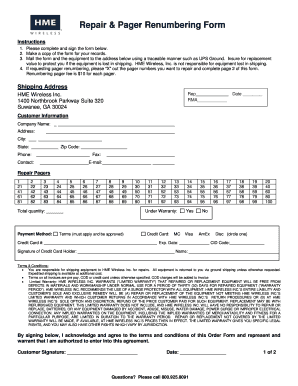
Get Hme Pager Repair Form
How it works
-

Open form follow the instructions
-

Easily sign the form with your finger
-

Send filled & signed form or save
How to use or fill out the Hme Pager Repair Form online
Filling out the Hme Pager Repair Form online is a straightforward process that allows users to request repairs or renumbering of their pagers efficiently. This guide provides a step-by-step approach to completing the form accurately to ensure your request is processed without delays.
Follow the steps to successfully complete the Hme Pager Repair Form.
- Click ‘Get Form’ button to access the Hme Pager Repair Form in your preferred editor.
- Begin by filling in the date at the top of the form to indicate when the request is being submitted.
- Provide your customer information in the designated fields. This includes your company name, address, city, state, zip code, phone number, contact person, fax, and email. Ensure that all provided information is accurate.
- Specify the pagers you wish to repair by entering the corresponding numbers in the 'Repair Pagers' section. If you are requesting renumbering for any of your pagers, make sure to mark out the pager numbers that you want to repair.
- Indicate the total quantity of pagers you are sending for repair or renumbering in the provided field. This helps in the processing of your request.
- Select your payment method by marking the appropriate options for credit card type and filling in the credit card number, expiration date, and CID code. Additionally, include the signature of the credit card holder and the name.
- Review the terms and conditions section carefully. You will need to acknowledge your understanding by signing the form at the bottom.
- Once the form is completely filled out, make a copy for your records, and prepare to mail the original form along with the equipment to the address provided. Use a traceable shipping method to ensure the equipment is protected during transit.
- Finally, choose to save your changes, download the completed form for your files, or print it out for mailing purposes.
Start filling out the Hme Pager Repair Form online now to ensure your pager gets the maintenance it needs.
Programming A JTECH Transmitter To enter programming mode, press SETUP, use password 1379 and hit ENTER. Use the */MENU button to scroll and the #/SELECT button to choose the menu option. Once you have saved your changes, hit CANCEL until you return to the main Pager # screen.
Industry-leading security and compliance
US Legal Forms protects your data by complying with industry-specific security standards.
-
In businnes since 199725+ years providing professional legal documents.
-
Accredited businessGuarantees that a business meets BBB accreditation standards in the US and Canada.
-
Secured by BraintreeValidated Level 1 PCI DSS compliant payment gateway that accepts most major credit and debit card brands from across the globe.