Loading
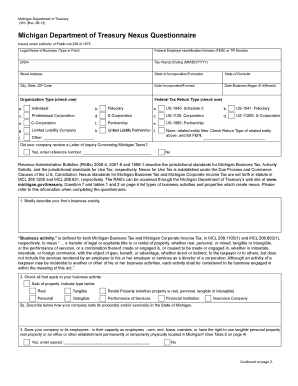
Get Michigan Form 1353
How it works
-

Open form follow the instructions
-

Easily sign the form with your finger
-

Send filled & signed form or save
How to fill out the Michigan Form 1353 online
Michigan Form 1353 is a Nexus Questionnaire used to determine the business's tax obligations in Michigan. This guide provides a clear and supportive approach to help users confidently complete the form online.
Follow the steps to fill out the Michigan Form 1353 online.
- Click ‘Get Form’ button to obtain the form and open it in the online editor.
- Enter the legal name of your business in the designated field. Be sure to type or print it clearly.
- Provide the Federal Employer Identification Number (FEIN) or TR Number in the appropriate field.
- If applicable, enter the name under which your business does business (D/B/A).
- Indicate the tax years ending by filling in the date(s) in MM/DD/YYYY format.
- Complete the street address, city, state, and ZIP code for your business location.
- Specify your state of incorporation or formation as well as the state of domicile.
- Fill in the date when your business was incorporated or formed, followed by the date you officially began operations, if different.
- Select the organization type by checking one of the provided boxes that match your business structure.
- Select the type of federal tax return your business files by checking the appropriate option.
- Answer yes or no to the question regarding whether your company received a Letter of Inquiry Concerning Michigan Taxes, and provide the reference number if applicable.
- Briefly describe your firm’s business activity. Use concise and clear language.
- Check all applicable options regarding your business activities, such as the sale of property or performance of services.
- Proceed to answer questions about whether your business or employees have tangible assets or physical presence in Michigan.
- Answer yes or no for the subsequent questions regarding business activities conducted in Michigan and the use of representatives.
- Complete all sections related to delivery of goods and confirm if your business operates as a part of a Unitary Business Group (UBG).
- Review your answers carefully to ensure accuracy, then proceed to the declaration section.
- Sign the form and include the printed name, title, and contact information of the person completing it.
- Once all fields are completed and verified, you can save changes, download, print, or share the form as needed.
Complete your Michigan Form 1353 online today for a smooth filing experience.
To fill out a notice to quit in Michigan, specify the tenant's name, property address, and the reason for the notice. It’s essential to follow the guidelines outlined in Michigan Form 1353 to avoid legal issues. After drafting, serve the notice in accordance with Michigan laws to ensure compliance and effective communication with the tenant.