Loading
Get Nps Ewc Form
How it works
-

Open form follow the instructions
-

Easily sign the form with your finger
-

Send filled & signed form or save
How to fill out the Nps Ewc form online
Filling out the Nps Ewc Form online can provide a convenient way to manage your eligibility information efficiently. This guide walks you through each section of the form step-by-step, ensuring a smooth completion process for all users, regardless of their experience with digital forms.
Follow the steps to fill out the Nps Ewc form online effectively.
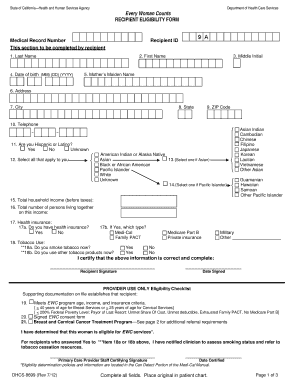
- Click ‘Get Form’ button to access the Nps Ewc Form and open it in your preferred digital editing tool.
- In the section for recipient identification, input your last name in the designated field.
- Fill in your first name and middle initial in their respective fields.
- Provide your date of birth in the format MM/DD/YYYY.
- Enter your mother’s maiden name in the required field.
- Complete your address information, including street address, city, state, and ZIP code.
- Provide your telephone number for contact purposes.
- Indicate whether you identify as Hispanic or Latino by selecting Yes, No, or Unknown.
- Select all applicable ethnic backgrounds by reviewing the options provided.
- Report your total household income before taxes in the specified field.
- State the total number of individuals living in your household on this income.
- Indicate your health insurance status by responding to whether you have health insurance.
- If you have health insurance, specify the type by selecting from the available options.
- Indicate your tobacco use by answering whether you currently smoke tobacco or use other tobacco products.
- Finish the form by certifying that all information provided is correct, followed by your signature and the date signed.
- Once completed, ensure all fields are filled out and consider saving your changes, downloading, printing, or sharing the form for your records.
Complete your Nps Ewc Form online today for a seamless experience.
The procedure for NPS involves several steps, beginning with completing the NPS EWC form. After registration, contributions must be made regularly to build your retirement corpus. You can manage your investments through the online portal or a financial advisor. Understanding each step helps you make informed decisions about your retirement savings.