Loading
Get Ad 1047
How it works
-

Open form follow the instructions
-

Easily sign the form with your finger
-

Send filled & signed form or save
How to fill out the Ad 1047 online
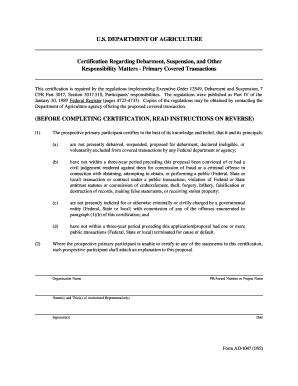
The Ad 1047 form is a certification regarding debarment, suspension, and other responsibility matters necessary for participating in federal transactions. This guide will walk you through the process of completing the form online with clear, step-by-step instructions.
Follow the steps to complete the Ad 1047 form online
- Press the ‘Get Form’ button to obtain the form and access it in the online editor.
- Start by entering your organization's name in the designated field. This is the name of the entity that will be certifying its eligibility.
- Next, input the PR/Award number or project name in the appropriate section. This helps identify the specific transaction related to the certification.
- Fill in the names and titles of the authorized representatives who are certifying the information on behalf of the organization.
- Review the certification statements carefully. You will need to affirm that your organization and its principals meet all required conditions stated in the certification.
- After reviewing the form for accuracy, sign it digitally in the signature field provided. Make sure that all representatives who are required to sign have done so.
- Finally, specify the date of certification before submitting the form.
- Once completed, you can save your changes, download the form for your records, print it out, or share it as necessary.
Complete your documentation online with confidence today!
A form 1048, often referred to in the context of USDA documentation, is used to report specific compliance issues and data. This form plays a crucial role in maintaining transparency and accountability within federal assistance programs. If you are dealing with matters related to Ad 1047, knowing how to fill out form 1048 can provide significant benefits in managing your compliance effectively.