Loading
Get Form 7016 1 Pps
How it works
-

Open form follow the instructions
-

Easily sign the form with your finger
-

Send filled & signed form or save
How to fill out the Form 7016 1 Pps online
Filling out the Form 7016 1 Pps online can be a straightforward process with the right guidance. This guide provides a clear, step-by-step approach to ensure that you complete the form accurately and efficiently.
Follow the steps to fill out the Form 7016 1 Pps online effectively.
- Press the ‘Get Form’ button to acquire the form and open it in your preferred editor.
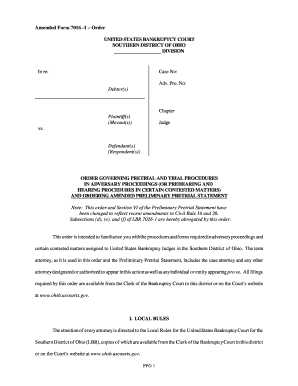
- Begin by entering the case number and the Adv. Pro. number at the top of the form. Make sure these numbers are accurate as they identify your specific case.
- Fill in the names of the debtor(s) and the plaintiff(s) (movant(s)). Ensure correct spelling and complete names, as they will be used throughout the proceedings.
- Specify the chapter under which your case falls, using the appropriate designation. This is crucial for the court’s categorization of the case.
- Indicate the judge presiding over your case by including their name in the designated area.
- Review the Order Governing Pretrial and Trial Procedures to familiarize yourself with the rules and requirements. This will help you comply with the local and procedural rules mentioned.
- Complete the Preliminary Pretrial Statement by outlining relevant information concerning the case, which includes responding to the necessary inquiries as laid out in the order.
- After filling out all required sections, carefully review all entries for accuracy and completeness.
- Once satisfied with your entries, save your changes, and if required, download, print, or share the completed form as appropriate.
Begin your document preparation now by completing the Form 7016 1 Pps online.