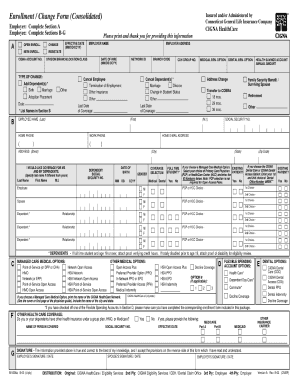
Enrollment / Change Form (Consolidated) Employer: Complete Section A Employee: Complete Sections B-G Please print and thank you for providing this information EMPLOYER NAME EMPLOYER ADDRESS EFFECTIVE.
Open form follow the instructions
Easily sign the form with your finger
Send filled & signed form or save
How to fill out the Cigna Enrollment Change Form Consolidated online
Filling out the Cigna Enrollment Change Form Consolidated is a straightforward process that allows users to update their enrollment information efficiently. This guide provides clear, step-by-step instructions to ensure that you complete the form accurately and easily.
Follow the steps to fill out the Cigna Enrollment Change Form Consolidated online
- Press the ‘Get Form’ button to access the Cigna Enrollment Change Form Consolidated and open it for editing.
- Carefully read the instructions provided on the first page of the form to ensure you understand all requirements.
- Enter your personal information in the designated fields, including your full name, date of birth, and contact information. Ensure all details are accurate.
- Review the section regarding your current enrollment status and indicate any changes you wish to make by checking the appropriate boxes.
- If applicable, provide information regarding dependents or family members who may be affected by the enrollment changes. Make sure to fill in each required field related to their details.
- In the additional comments section, you may write any specific notes or additional information relevant to your changes.
- Thoroughly review all entered information for accuracy and completeness, making sure there are no omissions.
- Once you have finished filling out the form, you can save your changes, download the completed form, print it for your records, or share it as necessary.
Start completing your Cigna Enrollment Change Form Consolidated online now!
Experience a faster way to fill out and sign forms on the web. Access the most extensive library of templates available.
Related content
Enrollment / Change Form (Consolidated). EMPLOYEE'S SIGNATURE / DATE. Cat. #740000d Rev...
ASO only. CIGNA HealthCare of North Carolina, Inc. Medical Indemnity. Decline Coverage...
Philadelphia, colloquially Philly, is the largest city in the U.S. state of Pennsylvania...
Get answers to your most pressing questions about US Legal Forms API.
What is the fax number for Cigna medical records?
The fax number for Cigna medical records varies depending on your specific plan. Make sure to check the Cigna Enrollment Change Form Consolidated or contact Cigna's customer service for the most accurate fax number. Properly sending your medical records ensures timely handling of your information.
What is the lawsuit against Cigna?
There have been various lawsuits against Cigna, primarily concerning claims handling and service issues. It is important to stay informed about your rights and provisions under your Cigna plan. For detailed and updated information, you may find it helpful to visit official resources or forums discussing the Cigna Enrollment Change Form Consolidated and other relevant topics.
Where do I send Cigna claim forms?
You should send Cigna claim forms to the address specified on the form itself. Ensure you review the Cigna Enrollment Change Form Consolidated for the correct submission details based on your particular circumstances. Properly directing your forms helps in speeding up the claims process.
What is a claims submission address?
The claims submission address is where you send your claim forms for processing. It is essential to submit claims to the correct address to avoid delays. You can find the specific address on the Cigna Enrollment Change Form Consolidated, depending on your plan type.
How long does it take for Cigna to process a claim?
Claim processing times can vary, but typically Cigna processes claims within a few weeks. To ensure a smooth workflow, make sure to submit accurate information through the Cigna Enrollment Change Form Consolidated. By doing this, you help Cigna expedite the processing of your claims effectively.
How do I update provider information with Cigna?
To update your provider information with Cigna, you should complete the Cigna Enrollment Change Form Consolidated. This form allows you to make necessary adjustments to your details efficiently. Once you fill it out, submit it through the platform, and you can expect updates to your provider information promptly.
How to join a Cigna class action lawsuit?
To join a Cigna class action lawsuit, you should look for active cases in your state and determine if you qualify. Typically, you will need to fill out a form or submit a statement to express your intent to participate. Don't forget that utilizing the Cigna Enrollment Change Form Consolidated can help streamline your participation in ongoing legal actions.
How to change dental provider with Cigna?
Changing your dental provider with Cigna can be done online or by calling customer support. It's important to familiarize yourself with your plan's network and coverage options. You may also need to file a Cigna Enrollment Change Form Consolidated to document any changes properly.
What is an AOR form Cigna?
An AOR form, or Authorization of Representation form with Cigna, allows an individual to designate someone else to represent them in dealings with the insurance company. This can be crucial in handling appeals or claims. If you're managing changes or seeking assistance, be sure to check if the Cigna Enrollment Change Form Consolidated is also required.
Is Cigna Health insurance going out of business?
Cigna Health insurance is not going out of business; it continues to serve millions of members across the United States. The company remains committed to providing quality coverage and care. For any changes to your policies or to update personal information, consider using the Cigna Enrollment Change Form Consolidated.
Use professional pre-built templates to fill in and sign documents online faster. Get access to thousands of forms.
If you believe that this page should be taken down, please follow our DMCA take down process here.