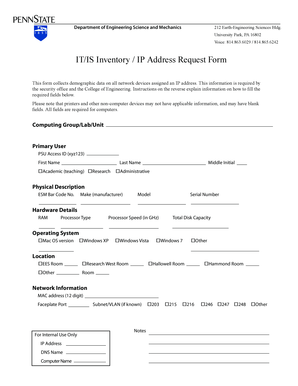
Get It/is Inventory / Ip Address Request Form - Esm Psu
How it works
-

Open form follow the instructions
-

Easily sign the form with your finger
-

Send filled & signed form or save
How to fill out the IT/IS Inventory / IP Address Request Form - Esm Psu online
Completing the IT/IS Inventory / IP Address Request Form - Esm Psu online is a straightforward process that helps collect important information about network devices. This guide aims to provide clear and concise instructions to ensure a smooth completion of the form.
Follow the steps to effectively fill out the form.
- Press the ‘Get Form’ button to access the IT/IS Inventory / IP Address Request Form. This will open the form for you to begin filling it out.
- In the 'Computing Group/Lab/Unit' section, enter the cost center or academic unit associated with the equipment. This could be academic, research, or administrative, depending on the funding source for the equipment.
- Fill in the 'Primary User' section with the name of the person or people who will regularly use the equipment, along with their PSU Access ID, formatted as xyz123.
- Provide the physical description of the computing device, including the ESM Bar Code number, make (manufacturer), model, and serial number. The bar code is typically in the form 10xxx.
- Enter detailed hardware specifications: the total installed RAM, processor type, processor speed (in GHz), and total disk capacity (e.g., 1TB or 250GB). Ensure this information reflects computers only, as it may not apply to other devices.
- Select the operating system from the provided options, such as Windows or Mac OS. This may not be relevant for non-computer devices.
- Fill in the 'Location' section by indicating where the device is situated, using available options as needed. Add specific room numbers if applicable.
- Provide the MAC address of the device, which is essential for network identification. This can be obtained via the device's command prompt for Windows or system preferences for other operating systems.
- Complete the form by including any internal notes, IP address, DNS name, computer name, and subnet/VLAN if known. These details aid in network administration.
- Once all sections have been filled out, review for accuracy. You can then save your changes, download a copy of the form, print it, or share it as needed.
Begin completing your IT/IS Inventory / IP Address Request Form online today!
To reserve an IP address for your Raspberry Pi, access your router’s DHCP reservation settings and input the MAC address of the Raspberry Pi. This ensures that the router always assigns the same IP address to it whenever it connects. It's a reliable way to maintain consistent network connectivity. The IT/IS Inventory / IP Address Request Form - Esm Psu can help you keep all reservations documented and organized.
Industry-leading security and compliance
-
In businnes since 199725+ years providing professional legal documents.
-
Accredited businessGuarantees that a business meets BBB accreditation standards in the US and Canada.
-
Secured by BraintreeValidated Level 1 PCI DSS compliant payment gateway that accepts most major credit and debit card brands from across the globe.