Loading
Get Ordersbibliophile Bookscom Form
How it works
-

Open form follow the instructions
-

Easily sign the form with your finger
-

Send filled & signed form or save
How to fill out the Ordersbibliophile Bookscom Form online
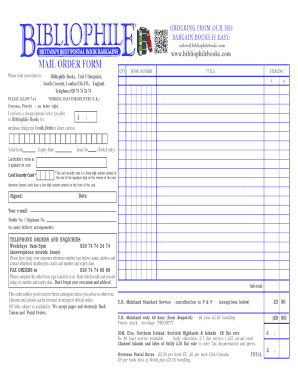
Filling out the Ordersbibliophile Bookscom Form online can streamline your purchasing process for books. This guide provides clear, step-by-step instructions to help you navigate each section of the form effectively.
Follow the steps to complete your order form effortlessly.
- Click ‘Get Form’ button to obtain the form and open it in the editor.
- Begin the form by entering the quantity of books you wish to order in the 'QTY' field. Ensure the number reflects your requirements accurately.
- Next, input the book number corresponding to each title you are ordering. This helps in accurately identifying the books you want.
- Fill out the title of each book in the provided space. Double-check for spelling errors to avoid any issues with your order.
- Indicate the total amount using the space provided under 'TOTAL.' This should reflect the cost of the books plus any applicable shipping fees.
- If paying by cheque or postal order, include the amount payable to Bibliophile Books. Alternatively, provide your credit, debit, or American Express card information, including the card number, valid dates, and cardholder's name.
- For security, provide the card security code, which is essential for processing your payment. Ensure this is correct.
- Sign the order form to authorize your payment and include the date of signing. This confirms your intent to complete the transaction.
- Lastly, provide your email and telephone number to assist with delivery arrangements. This information is crucial for communication regarding your order.
- After completing the form, review all entries for accuracy. Save changes, download, print, or share the form as needed based on your preferences.
Start filling out your Ordersbibliophile Bookscom Form online today!
To fill out a sales order book, start with the customer's information, including name and contact details. Record the items ordered, along with quantities and prices. Include the date of the order and any additional notes or payment instructions as necessary. Accessing the Ordersbibliophile Bookscom Form could offer you specific formats designed to streamline this process.