Loading
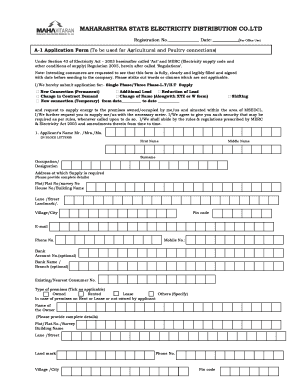
Get A1form Blank Image
How it works
-

Open form follow the instructions
-

Easily sign the form with your finger
-

Send filled & signed form or save
How to fill out the A1form Blank Image online
Filling out the A1form Blank Image accurately is essential for obtaining agricultural and poultry electricity connections. This guide is designed to walk you through each section of the form, ensuring that you provide the necessary information clearly and correctly.
Follow the steps to complete the A1form Blank Image online.
- Press the ‘Get Form’ button to access the form and open it in your preferred online editor.
- Begin by filling in the registration number and date at the top of the form. Ensure all fields are filled legibly.
- In the section labeled 'Application for', choose the type of connection you are applying for, such as 'New Connection (Permanent)' or 'Additional Load'. Mark your selection clearly.
- Provide your personal details under 'Applicant’s Name', filling out the first name, middle name, and surname in block letters. Include your occupation, address, and contact information.
- State your requirements in section 2. Tick the appropriate purpose of the connection (e.g., agriculture, poultry). Detail the apparatus you will use by filling in the total number of points and wattage for each type of equipment.
- If applicable, indicate any changes in contract demand or load in the designated fields, ensuring you include both existing and requested values.
- List your licensed electrical contractor’s details in section 3 with full address and contact information. This ensures installation compliance.
- Attach a list of required documents in section 4. Make sure to include the A1 form, proof of ownership, and any necessary certificates.
- Review the declarations at the end of the form. By signing, you confirm the accuracy of the information provided.
- After completing the form, save your changes, download it for your records, and submit the completed form along with the necessary documents to the appropriate office.
Start filling out your A1form Blank Image online today to ensure a smooth application process.
Creating fill-in-the-blank sections involves outlining the main ideas and leaving spaces for responses. Utilize tools like A1form Blank Image to design these sections effectively within your forms. This method allows you to collect organized responses while also keeping your forms visually appealing. Ensure you guide your users on how to interact with the blanks for the best experience.