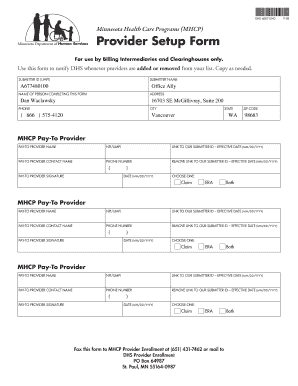
Get Mhcp Provider Setup Form
How it works
-

Open form follow the instructions
-

Easily sign the form with your finger
-

Send filled & signed form or save
How to fill out the Mhcp Provider Setup Form online
The Mhcp Provider Setup Form is an essential document for billing intermediaries and clearinghouses. This guide provides a clear and supportive overview of how to complete the form online, ensuring that your provider information is accurately submitted to the Minnesota Health Care Programs.
Follow the steps to complete the Mhcp Provider Setup Form online.
- Click ‘Get Form’ button to obtain the Mhcp Provider Setup Form and open it in your preferred online editor.
- Begin by filling out the 'Submitter ID (UMPI)' field with your unique identifier. This is necessary for proper tracking and association with your submissions.
- In the 'Submitter Name' field, enter the name of the billing intermediary or clearinghouse. Ensure this is precise as it reflects your organizational identity.
- Provide the name of the person completing the form in the 'Name of Person Completing This Form' section. This identifier is important for communication purposes.
- Next, fill in the 'Address' section with the complete mailing address of your organization, including street, city, state, and zip code.
- Enter the contact phone number in the 'Phone' field. This should be a direct line to facilitate follow-up.
- For each 'MHCP Pay-To Provider' section, enter the name of the pay-to provider and their NPI/UMPI number.
- Include the contact name for the pay-to provider along with their phone number. This ensures that any queries can be directed to the correct individual.
- Sign the form in the 'Pay-To Provider Signature' section. This signature affirms the validity of the submitted information.
- Record any effective dates in the designated fields. This includes the date associated with linking or removing a submitter ID.
- Select the appropriate option under 'Choose One' for either Claim, ERA, or Both, to indicate the type of services.
- Once all information is completed and verified, save your changes. Then, download the form for your records.
- Finally, print the document or share it with your organization as necessary. Remember to fax the completed form to MHCP Provider Enrollment at (651) 431-7462 or mail to their address at DHS Provider Enrollment, PO Box 64987, St. Paul, MN 55164-0987.
Complete your documentation online and ensure timely processing by following these steps.
The provider enrollment process involves several steps, including gathering documentation, completing the necessary forms, and submitting them to the relevant health plans or agencies. This process can differ by organization, but typically it requires a thorough review of qualifications and services. Utilizing the Mhcp Provider Setup Form simplifies this workflow, helping you navigate the complexities and start receiving patient referrals quickly.
Industry-leading security and compliance
-
In businnes since 199725+ years providing professional legal documents.
-
Accredited businessGuarantees that a business meets BBB accreditation standards in the US and Canada.
-
Secured by BraintreeValidated Level 1 PCI DSS compliant payment gateway that accepts most major credit and debit card brands from across the globe.