Get 2009 Ar3 Form
How it works
-

Open form follow the instructions
-

Easily sign the form with your finger
-

Send filled & signed form or save
How to fill out the 2009 AR3 Form online
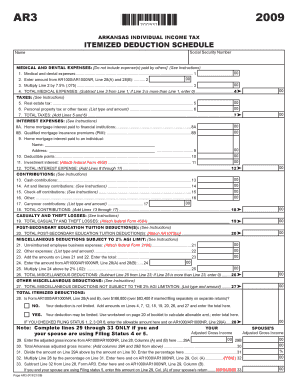
The 2009 AR3 Form is essential for individuals itemizing their deductions on Arkansas individual income tax returns. This guide provides step-by-step instructions to help users navigate and complete the form online with ease.
Follow the steps to fill out the form accurately and efficiently.
- Click the ‘Get Form’ button to access the form and open it in your preferred editor.
- Begin by entering your Social Security Number and full name in the designated fields.
- For medical and dental expenses, input the total amount paid by you only, excluding expenses covered by others. This total will go in Line 1.
- In Line 2, enter the amount you obtained from AR1000/AR1000NR, specifically from Lines 28(A) and 28(B).
- Calculate 7.5% of the amount from Line 2 and enter that figure in Line 3.
- For Line 4, subtract the amount in Line 3 from Line 1. If Line 3 exceeds Line 1, enter 0.
- Proceed to the Taxes section. Enter your real estate tax in Line 5 and any personal property tax or other taxes in Line 6.
- Add the amounts on Lines 5 and 6 and enter that total in Line 7.
- In the Interest Expenses section, input your home mortgage interest paid to financial institutions in Line 8A and any qualified mortgage insurance premiums in Line 8B.
- Detail any home mortgage interest paid to an individual in Line 9, including their name and address.
- If applicable, enter deductible points in Line 10 and investment interest (attach federal Form 4952) in Line 11.
- Sum all interest expenses from Lines 8 through 11 and record the total in Line 12.
- For contributions, enter any cash contributions in Line 13, and fill out Lines 14 through 17 for any other types of contributions.
- Add the contributions from Lines 13 to 17 and enter the total in Line 18.
- If you experienced any casualty or theft losses, report that total in Line 19, attaching federal Form 4684.
- For education deductions, enter the total post-secondary education tuition deduction in Line 20 (attach AR1075(s)).
- Complete the Miscellaneous Deductions section by reporting any unreimbursed employee business expenses in Line 21 and other expenses in Line 22.
- Add the amounts from Lines 21 and 22, entering the total in Line 23.
- Input the figure from AR1000/AR1000NR, Line 28(A) and 28(B) into Line 24 and multiply that by 2% for Line 25.
- Subtract the amount in Line 25 from Line 23 to determine the total miscellaneous deductions, recording that figure in Line 26.
- For the total miscellaneous deductions not subject to the 2% AGI limitation, provide the details in Line 27.
- Navigate to the Total Itemized Deductions section. If applicable, check whether your deduction amount is limited by using the conditions outlined on the form.
- Finally, sum the final amounts as instructed and ensure to enter the total on lines specified, then save, download, print, or share the completed form as necessary.
Complete your 2009 AR3 Form online today to ensure accurate itemization of your tax deductions.
To file ITR 3 without triggering an audit, focus on accurate and truthful reporting of your income and deductions. Ensure that the data you provide aligns with your financial records to maintain consistency. When using the 2009 Ar3 Form, double-check all entries and cross-reference with supportive documentation. Utilizing a reputable platform like uslegalforms can help you navigate the complexities and reduce the chances of an audit.